[@tom.heuser83] [@Josh Rackstraw] I thought I responded to this several days ago but my response seems to have failed to post.
OK I think I understand the problem you are trying to solve now and it isn’t the problem you are trying to solve!
You are trying to implement an image map . This is non trivial on multiple device sizes and image resolutions. Instead of using buttons for your click capture what you will need to do is determine image co-ordinates to where the ‘hot spots’ on the image are. These will be different for different image resolutions (sizes really).
So the way to accomplish this with wix (since you don’t have access to the capability in html, unless you use an htmlComponent, is to use the onClick() event information.
If you look at the mouseEvent documentation you should get all the clues you need to do this 
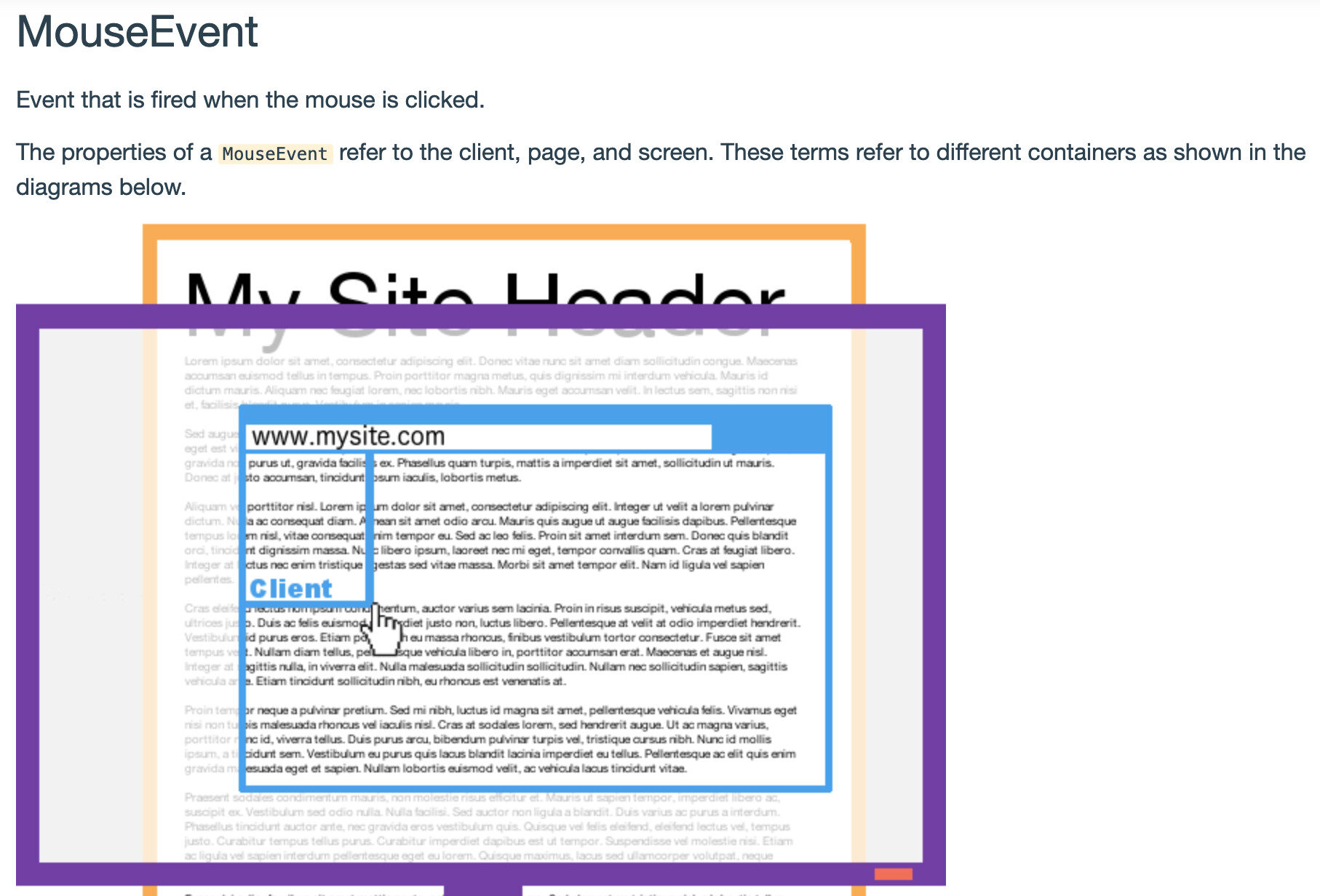
So if you construct an array of coordinate objects with target URL for each image resolution you should be able to solve the problem.
So for example have an array like this (which can also be placed in a data collection).:
let imageMap = [
    // Box top left
    {"imageName":"wix:image://v1/68d3a9_1de7529c444b4c9eb38401f8efe0cad2.jpg/flowers.jpg#originWidth=1970&originHeight=1120", "screenResolution":"1970x1120", "hotspotName":"hotspotName1", "xLeft":0, "xRight":511, "yTop":0, "yBottom":511, "toLink":"linkForHotspot1"},
    // Box bottom left
    {"imageName":"wix:image://v1/68d3a9_1de7529c444b4c9eb38401f8efe0cad2.jpg/flowers.jpg#originWidth=1970&originHeight=1120", "screenResolution":"1970x1120", "hotspotName":"hotspotName2", "xLeft":0, "xRight":511, "yTop":512, "yBottom":1023, "toLink":"linkForHotspot2"},
    // Box top right
    {"imageName":"wix:image://v1/68d3a9_1de7529c444b4c9eb38401f8efe0cad2.jpg/flowers.jpg#originWidth=1970&originHeight=1120", "screenResolution":"1970x1120", "hotspotName":"hotspotName3", "xLeft":512, "xRight":1023, "yTop":0, "yBottom":511, "toLink":"linkForHotspot3"},
    // Box bottom right
    {"imageName":"wix:image://v1/68d3a9_1de7529c444b4c9eb38401f8efe0cad2.jpg/flowers.jpg#originWidth=1970&originHeight=1120", "screenResolution":"1970x1120", "hotspotName":"hotspotName4", "xLeft":512, "xRight":1023, "yTop":512, "yBottom":1023, "toLink":"linkForHotspot4"},
];

$w('#image').onClick(checkHotspotClicked);

function checkHotspotClicked(event) {
    let xPos = event.offsetX;
    let yPos = event.offsetY;
    let elementName = `#${event.target.id}`;
    let imageName = $w(elementName).src;
    let recordIndex = imageMap.findIndex((imageMapRecord) => {
        // Assume we will not find the correct record
        let result = false;
        // Check we have the record for the correct image
        if (imageMapRecord.imageName === imageName) {
            // We have a record for this image (image name has resolution built
            // in for simplicity). Extract resolution info to an array
            let imageResolution = imageMapRecord.screenResolution.split("x");
            let xMax = Number(imageResolution[0]);
            let yMax = Number(imageResolution[1]);
            if (xPos < xMax && yPos < yMax) {
                // clicked coords are in range
                // Check if this is the record we need
                if (imageMapRecord.xLeft <== xPos &&
                    imageMapRecord.xRight >== yPos &&
                    imageMapRecord.yLeft <== yPos &&
                    imageMapRecord.yRight >== xPos) {
                    // Image map record matched the clicked coordinates
                    if (imageMapRecord.toLink) {
                        result = true;
                    }
                }
            }
        }
        return result;
    });

    // If we found an index we can redirect the page
    if (recordIndex !== -1) {
        // Success
        wixLocation.to(imageMap[recordIndex].toLink);
    } else {
        console.log(`Clicked location [${xPos}, ${yPos}] is not an image hotspot`);
    }
}
Cheers
Steve