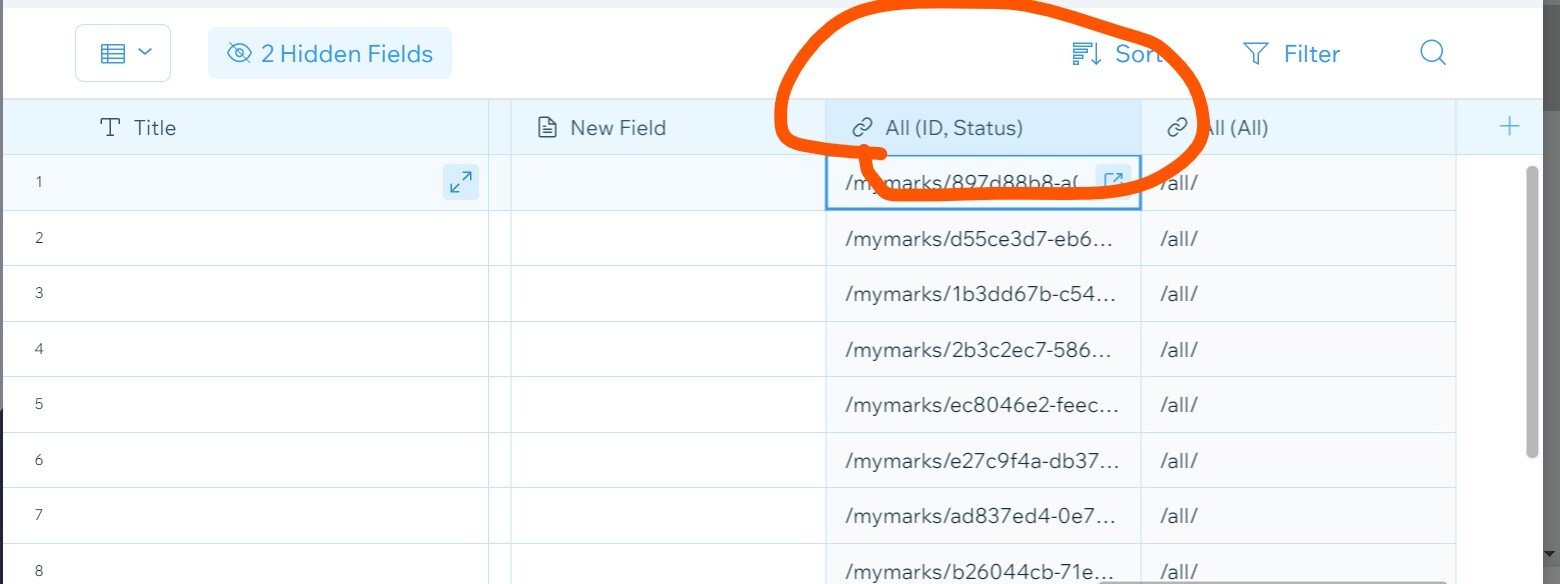
@ajithkrr tried! nothing changes as the code still throws off the rest of the code and therefore doesn’t work
This is the only way i got it to work without making errors on the rest of the code
$item("#profileClick").onClick((event) => {
                    wixData.query("mymarks")
                        .eq("_id", itemData._id)
                        .find()
                        .then((res) => {
 let fullName = res.items[0].fullName;
                            console.log(fullName);
 let id = res.items[0]._id;
                            console.log(id);
                            wixLocation.to(`/mymarks/${id}/${fullName}`);
                        })
                })
                .catch((error) => {
 let errorMsg = error.message;
 let code = error.code;
                    console.log(errorMsg);
                 } )
…removing the below made the rest of my code work, but again when the button is clicked nothing happens, event with ‘everyone’ permissions set
})
                .catch((error) => {
 let errorMsg = error.message;
 let code = error.code;
                    console.log(errorMsg);
                 } )
@paulogouveia Oops my error try this and see what you get in console…
$item ( “#profileClick” ). onClick (( event ) => {
wixData . query ( “mymarks” )
. eq ( “_id” , itemData . _id )
. find ()
. then (( res ) => {
let fullName = res . items [ 0 ]. fullName ;
console . log ( fullName );
let id = res . items [ 0 ]. _id ;
console . log ( id );
wixLocation . to ( /mymarks/${id}/${fullName} );
})
. catch (( error ) => {
let errorMsg = error . message ;
let code = error . code ;
console . log ( errorMsg );
} )
})
@ajithkrr tried the new code and the onclick doesnt do anything still… I changed the database name from ‘mymarks’ to ‘marks’ and the onclick did work however the url was not found as ofc its not from the same database
@paulogouveia IF nothing works try this … Worked very fine for me !!!
Surely, you have a dynamic link in your DATABASE
Click on the properties and get the field key
Now in your page (not dynamic page) use the below code →
$w('#repeater1').onItemReady(($item, itemData, index) => {
            $item('#profileCick').onClick((event) => {
 let link = itemData['fieldKeyHere'];  //field key you have copied
                wixLocation.to(`${link}`);

            });
        });
@ajithkrr the repeater is on a dynamic page? Tried the above and has the same issue…
$item("#profileClick").onClick((event) => {
 let link = itemData['link-mymarks-title']; //field key you have copied
                wixLocation.to(`${link}`);
        })
@paulogouveia Is the code in the repeater onItemReady ???
Make sure the button is in the repeater …
Make sure the button’s id is correct …
$w('#repeater1').onItemReady(($item, itemData, index) => {
            $item('#profileCick').onClick((event) => {
 let link = itemData['fieldKeyHere'];  //field key you have copied
 console.log(link);
                wixLocation.to(`${link}`);

            });
        });
*CHECK YOUR CONSOLE…
@ajithkrr yes within the repeater and all checked and all in order but no success! I think it’s the wixto. layout?
Hi
You have connected the repeater to “marks” database.
But when the button is clicked you want the user to be redirected to a dynamic page … But the dynamic page 's link is in the database ‘myMarks’ …
Is it ???
So, how the two database(s) are connected to each other ???
Is there any fields like ‘userId’ in “myMarks” database ???
Is there any fields like ‘userId’ in “mymarks.” database ???
@paulogouveia So →
The repeater is connected to ‘marks’ database
when the button, in the repeater, is clicked the user should be redirected to a dynamic page whose link is in ‘mymarks.’ database…
So, here my question - How it could find the link ???
If there is any field like userId in ‘mymarks.’ database , then we could query the current userId and see if it matches that of in the database…
Let’s say for an example →
User A clicks the button in the repeater …
So how could the user be redirected, if the link is in another database… there should be a connection between the two database(s)
There are many options…
-
You may create a field like ‘linkId’ in the ‘mymarks.’ database
It’s content should be that of a field in the ‘marks’ database …
-
You may create a field like ‘userId’ which stores the userId in ‘mymarks.’ database…
So when the button is clicked in the repeater, we can query the current userId to that of the userId in the database …
There is an owner_ field in mymarks database that should link back to the user who created it…surely we could use this?? - Paulo
Ok then try this code →
$w('#repeater1').onItemReady(($item, itemData, index) => {
 $item('#profileClick').onClick((event) => {
   wixData.query("mymarks.")
    .eq("_owner", wixUsers.currentUser.id)
    .find()
    .then((res) => {
      let fullName = res.items[0].fullName;
      let id = res.items[0]._id;
      wixLocation.to(`/mymarks/${id}/${fullName}`);
     });
   });
 });
@ajithkrr the code works! (If you’re looking to link back to current users profile) but what I’m trying to achieve on the repeater is link back to the owners profile, not my own?
Is this what you are trying to do…
When the button is clicked the current userId should be returned.
Then it should find the item which matches the userId
If so →
$w('#repeater1').onItemReady(($item, itemData, index) => {
 $item('#profileClick').onClick((event) => {
   wixData.query("mymarks.")
    .eq("_owner", wixUsers.currentUser.id)
    .find()
    .then((res) => {
      let fullName = res.items[0].fullName;
      let id = res.items[0]._id;
      wixLocation.to(`/mymarks/${id}/${fullName}`);
     });
   });
 });
From your photo, I found that your database name is ‘mymarks.’
GOT IT! Thanks @Ajit Kumar!
Click to owners dynamic profile page from repeater:
 $item('#profileClick').onClick((event) => {
                wixData.query("mymarks")
                    .eq("_owner",  itemData._owner)
                    .find()
                    .then((res) => {
 let fullName = res.items[0].fullName;
 let id = res.items[0]._id;
                        wixLocation.to(`/mymarks/${id}/${fullName}`);
                    });
            });
Click to current users dynamic profile page:
$w('#repeater1').onItemReady(($item, itemData, index) => {
 $item('#profileClick').onClick((event) => {
   wixData.query("mymarks.")
    .eq("_owner", wixUsers.currentUser.id)
    .find()
    .then((res) => {
      let fullName = res.items[0].fullName;
      let id = res.items[0]._id;
      wixLocation.to(`/mymarks/${id}/${fullName}`);
     });
   });
 });