Any update ?
Same issue here.
@givemeawhisky How do I get the country code of the user ?
The user will add it when they create a payment…
https://www.wix.com/corvid/reference/wix-pay-backend.html#PaymentUserInfo
Depending on what event.js you are using, you could simply call it with something like this in your code.
let country = event.userInfo.country;
Like here, which will get all the info from that payment.
Examples
An event fired when a payment transaction status is changed
// Place this code in the events.js file
// of your site's Backend section.

export function wixPay_onPaymentUpdate(event) {
  let paymentId = event.payment.id;
  let newTransactionStatus = event.status;
}

/*  Full event object:
 *  {
 *    "payment": {
 *      "id": "8b3c1a90-c09e-4cd7-ae9d-9801151d8ad9",
 *      "amount": 15.99,
 *      "currency": "USD",
 *      "items": [
 *        {
 *          "name": "Baseball Bat",
 *          "quantity": 1,
 *          "price": 15.99
 *        }
 *      ]
 *    },
 *    "userInfo": {
 *      "firstName": "Mike",
 *      "lastName": "Trout",
 *      "countryCode": "USA",
 *      "phone": null,
 *      "email": "mike.trout@email.com"
 *    },
 *    "status": "Successful",
 *    "transactionId": "83f1830a-c74e-4abe-894d-3ee388b7e985"
 *  }
 */
@alexzip2
Apologies for the delay, and thanks for letting us know it’s still an issue. We’re looking into it and we’ll let you know when it’s fixed.
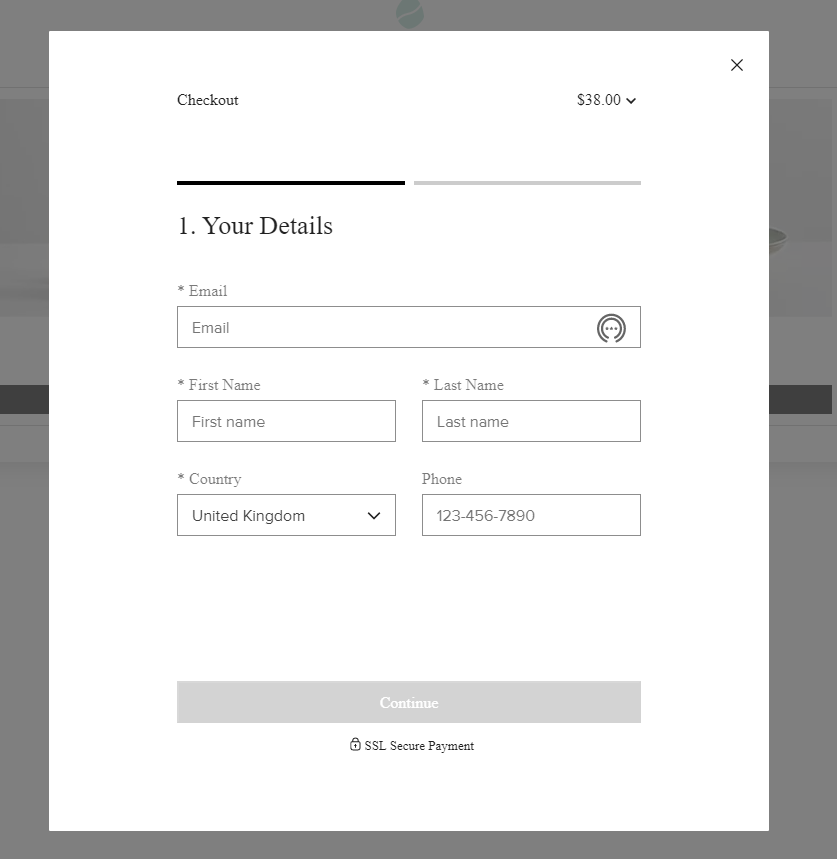
@givemeawhisky But I want to skip the user details page ( skipUserInfoPage) so I need to know in advance, no ?
It’s fixed! Please let us know if you’re still having any issues.
It doesn’t seem to be fixed. I’m still getting the user info prompt despite passing that flag as true.
Same here …
Got it. I’ll take it back to the team. Thanks for letting me know.
As was said earlier, skipUserInfoPage flag works only if complete userInfo ( phone is optional ) was passed to createPayment method. If any of the required fields are not passed - “user info” page will still be shown, with inputs prefilled with the values that were passed to userInfo .
Note that country code should be passed to countryCode field (and not country , @nancyhyyip FYI).
Thanks Serhii.
It does work when I put a country code hard coded, but how can I get the country code out of the member info ?
I don’t want to make it hard coded.
If I don’t skip this step, the country is prefilled with the country of the member.
If it is for members and they are logged in to the site, a lot of things are taken from their browser locale which is taken when they logged themselves in.
So the country choice would be set to whatever the browser locale was when they logged in.
@givemeawhisky When the members are signing up, they fill the country field.
It’s not from their browser locale.
How can I get it in corvid as a country code ?
So the browser locale is similar to what Jeff has mentioned below with using API if you want to set it yourself without using any user inputs.
If you use the Wix Members app you can get the Address shown on the My Account page, however you won’t be able to get all the details.
See this previous forum post.
https://www.wix.com/corvid/forum/community-discussion/member-s-collection-address%3Fpage%3D1%26dl%3D5ce7fb33227f2d0016962c8b%252F5ce333e054670c00a4d64602%252F2
So you would have to create another dataset, similar to using the Wix Member Profile tutorial and grab that needed info on your users signup form and use that info.
https://support.wix.com/en/article/corvid-tutorial-building-your-own-members-area
I have done similar myself on a website where the signup lightbox captures all the users details and closes after registering their details before returning to home page, then everything is saved in contacts and once site member is approved the member details will be added to ‘members’ database which is the one from the tutorial.
Also, as your members will be logged in when they access this, you can always use the Wix Users Backend API nd the getUser function to get teh users Address that way too.
https://www.wix.com/corvid/reference/wix-users-backend.html#getUser
https://www.wix.com/corvid/reference/wix-users-backend.html#Address
Are you collecting the users address by use of the Address Input provided in the Wix Editor or are you using seperate user inputs for each part.
https://support.wix.com/en/article/adding-and-setting-up-an-address-input-element
https://www.wix.com/corvid/reference/$w.AddressInput.html#value
https://www.wix.com/corvid/reference/$w.AddressInput.html#Address
You can use any API that will resolve user’s country based on IP. Corvid doesn’t have one.
Note, countryCode represents a country of the user that will be used as a part of Shipping address. Auto-detecting it without giving user the ability to modify it might be a bad idea, unless you are OK with possibly wrong country in the order. Ideally you should be giving that option to the user so he can pick country manually.
Hello all!
When this thread was originally published I wasn’t having any issues, but ever since there was an update that the “bug” was resolved I’ve begun to have issues.
I can pass userInfo the Pay API with “skipUserInfoPage” : false and I get the user info page pre-filled as I would expect. However, if it set it to true the payment window is displayed, but it’s just a spinning wheel.
Again, everything works as expected when the option is set to false but hangs up when I flip it to true.
CLIENT SIDE CODE:
createMyPayment(property._id, { firstName, lastName, phone, email, countryCode }, CheckIn, CheckOut, numRooms)  // When the payment has been created and a paymentId has been returned:
     .then((payment) => {

          // Step 5 - Call the startPayment()
          function with the paymentId.
          wixPay.startPayment(payment.id, {
          "skipUserInfoPage": true })

      // Step 6 - Visitor enters the payment information.
      });
BACKEND CODE:
export async function createMyPayment(propertyId, userInfo, CheckIn, CheckOut, numRooms) {
      // Step 3 - Create payment info object.
     let paymentInfo = {
           "items": [{
                        name: property.title
                        price: rateTotals.roomTotal
                    },
                    {
                        name: "Tax",
                        price: rateTotals.taxTotal
                    }
                    ],
                amount: rateTotals.grandTotal,
                userInfo
     }
     // Step 4 - Call createPayment() with the payment
     information and return the paymentId.
     return wixPay.createPayment(paymentInfo);

     // (Next, see step 5 in the client-side.)
}
Marlowe, any update on this issue? My pre-population works when false, but when set to true I get the spinning wheel of death.
Note, I have a support ticket open with more details (1525626777). I also have a comment below with code snippets.
Please try now.
I’m confused, try what now? This is continuning to occur. I try it daily hoping it resolves itself.
Try to test the scenario when loader is not disappearing. We’ve just deployed a change.