Create or Append a Contact with code

Question: How to create, update or append a contact with a user’s input values

Created contacts should appear on the Dash in Customers & Leads > Contacts right? But nothing has worked yet even at a basic level

Attempts (all failed!) :

Approach 1) Only front end code as per an older tutorial

import { contacts } from 'wix-crm';

$w.onReady(function () {
  $w('#submitButton').onClick((event) => {
    const contactInfo = {
      name: {
        first: $w('#input7').value,
        last: "Thereyet"
      },
      emails: [{
          email: "gene.lopez@example.com"
        }]
    };

    contacts.appendOrCreateContact(contactInfo)
      .then((resolvedContact) => {
        return resolvedContact;
      })
      .catch((error) => {
        console.error(error);
      });          
  })
});

Approach 2) AI Velo Assistant on Velo Docs

// Backend code - contacts.jsw
import { contacts } from 'wix-crm.v2'; // Or 'wix-crm-backend'
import { elevate } from 'wix-auth';
import { webMethod, Permissions } from 'wix-web-module';

export const createNewContact = webMethod(Permissions.Anyone, async (contactInfo) => {
  try {
    const elevatedCreateContact = elevate(contacts.createContact);
    const newContact = await elevatedCreateContact(contactInfo);
    return newContact;
  } catch (error) {
    console.error('Error creating contact:', error);
    throw new Error('Failed to create contact.');
  }
});
// Page code
import { createNewContact } from 'backend/contacts.jsw'; 
$w.onReady(function () {
  $w('#submitButton').onClick(async () => {
    const firstName = $w('#input7').value;
    const lastName = $w('#input16').value;  
    const email = $w('#input8').value;   

    const contactInfo = {
      name: {
        first: firstName,
        last: lastName
      },
      emails: [{
        email: email
      }]
    };
    createNewContact(contactInfo);
  });
});

Approach 3) GPT’s suggests only frontend

import { contacts } from 'wix-crm';
import { session } from 'wix-storage';
$w.onReady(function () {
  $w('#submitButton').onClick(() => createContact());
});
async function createContact() {
  const name = $w('#input7').value;
  const email = $w('#input8').value;
  try {
    const contactInfo = {
      name: { first: name },
      emails: [{ email }]
    };
    const newContact = await contacts.appendOrCreateContact(contactInfo);
    session.setItem("createdContactId", newContact.contactId);
  } catch (error) {
    console.error("Error creating contact:", error);
  }
}

Many thanks!

2 Likes

Correct :slight_smile:


I noticed the second example suggested contacts.jsw, however .jsw is deprecated, and the code within the suggestion is for a .web.js file (which is what we encourage using).


Here’s some sample code that works:

Frontend:

import { createNewContact } from "backend/contacts.web.js";

$w.onReady(function () {
    $w('#submitButton').onClick(async () => {
        const firstName = $w('#firstName').value;
        const lastName = $w('#lastName').value;
        const email = $w('#email').value;

        const contactInfo = {
            name: {
                first: firstName,
                last: lastName
            },
            emails: {
                items: [{
                    email: email
                }]
            }
        };
        createNewContact(contactInfo);
    });
});

Backend:

import { contacts } from "@wix/crm";
import { auth } from "@wix/essentials";
import { webMethod, Permissions } from 'wix-web-module';

export const createNewContact = webMethod(Permissions.Anyone, async (contactInfo) => {
    try {
        const elevatedCreateContact = auth.elevate(contacts.createContact);
        const newContact = await elevatedCreateContact(contactInfo);
        return newContact;
    } catch (error) {
        console.error('Error creating contact:', error);
        throw new Error('Failed to create contact.');
    }
});

Don’t forget to install the SDKs for the backend :slight_smile:

1 Like

Thanks Noah. I tried this, had nothing & spent a while debugging with GPT, no related errors are even showing. I feel completely clueless😓

1 Like

Can you share a link to the site?

1 Like

Hi, @Gideon_Skarzgard !!

Just to confirm, have you installed the SDK as Noah mentioned? I think he probably meant that you need to search for and install "@wix/crm" and "@wix/essentials" via npm. :innocent:

2 Likes

Heyy @onemoretime & @noahlovell , I found my error; a rookie mistake! Your related code was correct! even some older attempts. I just had the same button.onClick also stated earlier in the code so they were clashing. Thanks to your replies, I tested with cleaner slates & now learnt to remember that!

After this fundamental code was successful, I’ve been trying my main requirement further, but stuck.

I’m trying to append a text input to a custom field of a contact. This is to accumulate some requests/info from users.

This part’s been daunting. Though I understand the code better now, I’m uncertain abt some pieces & their placing.. when & where some variables should be defined & called. My latest attempt is below (modified out of code from SDK AI in dev docs). I’d appreciate your tips🙏

//**unsure which of these should go to the backend file
import { contacts } from '@wix/crm';
import { auth } from '@wix/essentials'; 
export async function appendToCustomField(contactId, customFieldKey, valueToAppend) {
  try {
    // Step 1: Retrieve the contact to get its current custom field value & revision
    // Elevate permissions if this function is called from frontend or needs elevated access
    const elevatedGetContact = auth.elevate(contacts.getContact);
    const contact = await elevatedGetContact(contactId);
    const currentRevision = contact.revision;
    const currentExtendedFields = contact.info.extendedFields?.items || {};

    // Step 2: Modify the custom field value
    let existingValue = currentExtendedFields[customFieldKey] || "";
    let newValue;
    valueToAppend = $w('#input16').value;
    newValue = existingValue + valueToAppend;
//**I tried replacing all [customFieldKey] with ["itsFieldName"]

    const updatedExtendedFields = {
      ...currentExtendedFields,   //**I wonder if these dots are correct
      [customFieldKey]: newValue
    };
    // Step 3: Update the contact with the modified custom field
    const updatedContactInfo = {
      extendedFields: {
        items: updatedExtendedFields
      }
    };
    const elevatedUpdateContact = auth.elevate(contacts.updateContact);
    const updatedContact = await elevatedUpdateContact(contactId, updatedContactInfo, currentRevision);
    console.log('Appended to custom field:', updatedContact);
    return updatedContact;
  } catch (error) {
    console.error('Error appending to custom field:', error);
    throw error;
  }
}
//the button part
$w.onReady(async function () {
//**I have working code getting the memberID. using getMember(). But unsure how to apply this
  $w("#submitButton").onClick(async () => {
    await appendToCustomField();
  });
}); 
1 Like

Good morning. :kissing_face: For now, since the $w selector can’t be used in the backend, I think you’ll need to modify the code so that values are passed from the frontend to the backend through function arguments. :innocent:

valueToAppend = $w('#input16').value;
2 Likes

Thanks:) Based on your tips, I split the code to the front & backends & tried several iterations. Still nothing

//backend code
import { contacts } from '@wix/crm';
import { auth } from '@wix/essentials'; // Required for elevated permissions if needed
export async function updateContactCustomField(contactId, customFieldKey, newCustomFieldValue) {
  try {
    // 1. Retrieve the contact to get its current revision
    const elevatedGetContact = auth.elevate(contacts.getContact); // Use elevate if necessary
    const contact = await elevatedGetContact(contactId);
    const revisionNumber = contact.revision;

    // 2. Prepare the update payload for the custom field
    const updatedContactInfo = {
      extendedFields: {
        items: {
          [customFieldKey]: newCustomFieldValue // Use bracket notation for dynamic key
        }
      }
    };

    // 3. Update the contact
    const elevatedUpdateContact = auth.elevate(contacts.updateContact); // Use elevate if necessary
    const updatedContact = await elevatedUpdateContact(contactId, updatedContactInfo, revisionNumber);
    console.log('Successfully updated contact custom field:', updatedContact);
    return updatedContact;
  } catch (error) {
    console.error('Error updating contact custom field:', error);
    throw error;
  }
}
//page code
import { updateContactCustomField } from 'backend/contacts.web.js'; 
$w.onReady(function () {
  $w('#submitButton').onClick(async () => {
    const contactId = "237ab08c-58ea-4f06-b002-5b8484fd9f34"; // actual contact ID (UUID)
    const customFieldKey = "custom.infoRequests"; // Replace with your custom field key
    const newCustomFieldValue = $w('#input16').value; // Get value from your text input

    if (newCustomFieldValue) {
      try {
        const result = await updateContactCustomField(contactId, customFieldKey, newCustomFieldValue);
        console.log("Custom field updated successfully:", result);
      } catch (error) {
        console.error("Failed to update custom field:", error);
      }
    } else {
      console.warn("Text input is empty. Please enter a value.");
    }
  });
});
1 Like

Have you already checked the logs in detail to determine exactly how far the process has succeeded? :upside_down_face:

1 Like

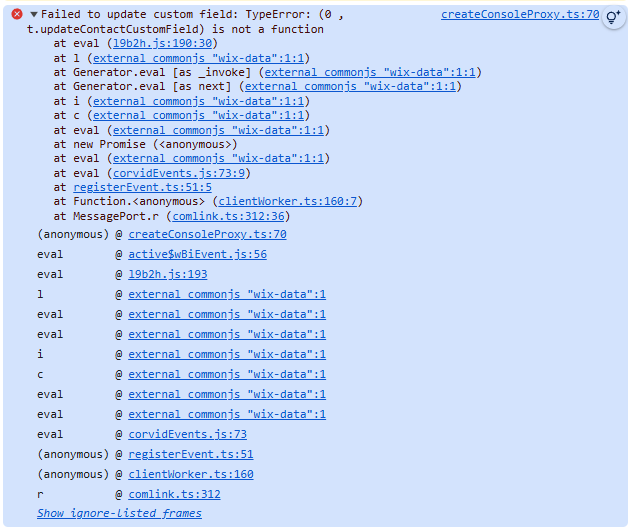
This is the one console error I got, which I’m not knowledgeable enough to interpret, but it seems the backend function hasn’t worked even at a basic level. If this doesn’t help find the issue, pls let me know how I can make it easier for you

GPT just says I should move this to a .jsw file…

1 Like

Yeah, that’s a very simple mistake. :kissing_face_with_smiling_eyes: The issue is that the backend function updateContactCustomField is still written in the old .jsw format, even though it’s being imported on the frontend as a .web.js module. This is a very common mistake. In other words, you can either rewrite the backend code using the .web.js format or simply import it as a .jsw file on the frontend, and it should work fine. Personally, I recommend updating it to the .web.js format for better consistency going forward. I was watching a soccer match earlier and got a bit too excited — to the point that I wasn’t feeling well — so I didn’t notice it at first. But as soon as I saw the error message you sent, it immediately clicked. It’s a very common error message. For now, go ahead and fix that part first. :innocent:

2 Likes

I’ve made significant progress thanks to you. After moving to a .jsw file it then logged a specific error; that the custom field wasn’t found. I then recreated a field named with only simple letters & it worked, it can now replace the field value.
I’ve been trying the appending part & now stuck here. My field is a text type

    // 2️⃣ Get the current field value (if it exists)
    const currentValue = contact.info?.extendedFields?.[customFieldKey];
    // 3️⃣ Determine how to append based on the existing type
    let updatedValue;
    if (Array.isArray(currentValue)) {
      // Append new value to array
      updatedValue = [...currentValue, newCustomFieldValue];
    } else if (typeof currentValue === 'string') {
      // Append to string (comma-separated)
      updatedValue = currentValue
        ? `${currentValue}, ${newCustomFieldValue}`
        : newCustomFieldValue;
    } else if (currentValue) {
      // If it exists but is neither array nor string, wrap both in an array
      updatedValue = [currentValue, newCustomFieldValue];
    } else {
      // No existing value — just set it
      updatedValue = newCustomFieldValue;
    }
1 Like

ChatGPT is largely basing it’s knowledge on older documentation/examples.

I’d highly recommend keeping it working with Web Methods since .jsw files are deprecated within the Wix ecosystem.

Web Methods aren’t simply exported functions as in the code shared. Here’s the documentation - webMethod() - and the code I shared earlier also wraps in Web Method as required to work within a .web.js file and make it accessible from the frontend

1 Like

Thank you! Will check it out

1 Like

Are you saying that even though the field is defined as a text type, it could still end up containing an array? :upside_down_face:

1 Like

I think not, but maintained uncertainty so someone that knows can inform me (whether text type here absolutely means type string, & even if so whether some syntax can make it act like other types). Anyway this was AI’s code that just gave many options. I’m most concerned with type text (as the only other types available in for custom field types are number, date & url)

To simplify I tried all the following variations that don’t give red underlines. But they either completely replaces or gives ‘undefined+ “the new value”’.

let updatedValue = currentValue + newCustomFieldValue;
let updatedValue = currentValue
  ? `${currentValue}, ${newCustomFieldValue}`
  : newCustomFieldValue;
let updatedValue = `${currentValue}, ${newCustomFieldValue}`;

How can I properly append?

1 Like

Hi:), a lot was solved thanks to you but I’m stuck at this key part. If you could give some tips on this part I’d be grateful

1 Like

To be honest, it would really help if you could clearly state once again exactly which contact field you’re ultimately trying to update. That would make the situation easier to understand and help others on the forum assist you more effectively. I haven’t personally used this API myself, so I can’t claim to know the exact answer just from reading the reference, and I’m a bit confused as well.

However, whenever things start to get confusing, the best approach is always the same: go back to basics, think simply, and verify each small step one by one. :innocent:

I’m not entirely sure which value you want to update, but are you trying to update a custom field you created inside extendedFields? Also, I believe what you’re attempting to do is almost identical to the example shown in the reference (only the updatedContactInfo part is different), so I think you can basically use that as it is. It’s already written in the .web.js format. :kissing_face_with_smiling_eyes:


/*************************************
 * Backend code - contacts.web.js/ts *
 ************************************/

import { Permissions, webMethod } from "@wix/web-methods";
import { contacts } from "@wix/crm";
import { auth } from "@wix/essentials";

export const overwriteContactInfo = webMethod(
  Permissions.Anyone,
  async (contactId, updatedContactInfo) => {
    try {
      // Retrieve the contact
      const elevateGetContact = auth.elevate(contacts.getContact);
      const contact = await elevateGetContact(contactId);
      // Extract revision number
      const revisionNumber = contact.revision;
      // Update the contact
      const elevateUpdateContact = auth.elevate(contacts.updateContact);
      const updatedContact = await elevateUpdateContact(
        contactId,
        updatedContactInfo,
        revisionNumber,
      );

      return updatedContact;
    } catch (error) {
      console.log(error);
      // Handle the error
    }
  },
);

/*************
 * Page code *
 *************/

import { overwriteContactInfo } from "backend/contacts.web";

$w.onReady(async function () {
  const contactId = "2712ae1d-3f64-46c2-ac3a-94a6c2e29847";
  const updatedContactInfo = {
    name: {
      first: "John",
      last: "Mitchell",
    },
  };
  async function updateContactName() {
    try {
      const updatedContact = await overwriteContactInfo(
        contactId,
        updatedContactInfo,
      );

      return updatedContact;
    } catch (error) {
      console.log(error);
      // Handle the error
    }
  }
  const result = await updateContactName();
  const first = result.contact.info.name.first;
  const last = result.contact.info.name.last;
  console.log(`Updated contact name: ${first} ${last}`);
});

Well, with this code, it seems like you could easily overwrite the predefined fields in the API (like name or emails). :slightly_smiling_face:
In your case, I understand that you have your own custom field values and are trying to handle them using extendedFields, right? :upside_down_face:

If that’s correct, you might need to experiment a bit to confirm how it behaves.
But my impression is that you could probably create the updatedContactInfo object in the same way as when updating fields like name or emails, and then simply pass it as an argument.
After that, the updateContact API should handle the rest automatically.

Though I haven’t tried it myself, so I can’t say for sure. :innocent:

1 Like

yes

So, all the steps worked except just the appending part, which I kept manipulating, and I GOT IT!
For your guidance @onemoretime ありがとうございます!

The full the working code for anyone needing it is at the bottom
(Bear in mind this may not be most reliable considering the backend is in a .jsw as pointed out above by noah)

//backend- contacts.jsw
import { contacts } from '@wix/crm';
import { auth } from '@wix/essentials'; // Required for elevated permissions if needed

export async function updateContactCustomField(contactId, customFieldKey, newCustomFieldValue) {
  try {
    // 1. Retrieve the contact to get its current revision
    const elevatedGetContact = auth.elevate(contacts.getContact); // Use elevate if necessary
    const contact = await elevatedGetContact(contactId);
    const revisionNumber = contact.revision;

    // 2️⃣ Get the current field value (if it exists)
    const currentExtendedFields = contact.info.extendedFields?.items || {};

    // Step 2: Modify the custom field value
    let updatedValue;
    let existingValue = currentExtendedFields[customFieldKey] || "";
    updatedValue = existingValue + newCustomFieldValue;

    // 4️⃣ Prepare the update payload
    const updatedContactInfo = {
      extendedFields: {
        items: {
          [customFieldKey]: updatedValue
        }
      }
    };

    // 5️⃣ Update the contact with the new value
    const elevatedUpdateContact = auth.elevate(contacts.updateContact);
    const updatedContact = await elevatedUpdateContact(contactId, updatedContactInfo, revisionNumber); 

    console.log('Successfully updated contact custom field:', updatedContact);
    return updatedContact;
  } catch (error) {
    console.error('Error updating contact custom field:', error);
    throw error;
  }
}
//frontend
import { updateContactCustomField } from 'backend/contacts.jsw'; // Adjust path as needed
$w.onReady(function () {
  $w('#submitButton').onClick(async () => {
    const contactId = "237ab08c-58ea-4f06-b002-5b8484fd9f34"; // Replace with actual contact ID
    const customFieldKey = "custom.fieldname"; // Replace fieldname with yours
    const newCustomFieldValue = $w('#input16').value; // Get value from your text input

    if (newCustomFieldValue) {
      try {
        const result = await updateContactCustomField(contactId, customFieldKey, newCustomFieldValue);
        console.log("Custom field updated successfully:", result);
      } catch (error) {
        console.error("Failed to update custom field:", error);
      }
    } else {
      console.warn("Text input is empty. Please enter a value.");
    }
  });
});
1 Like