I’m having trouble with
global.css!
Hi! I’m working on a personal website and was using the global.css to customize some elements (adding multiple shadows, animations etc) until it simply stopped working a few hours ago. I don’t see what I did wrong. The styles and interactions I entered earlier are still processed and working, but all the new ones I entered below a certain point aren’t.
Working in
Wix Studio Editor, global.css.
What I’m trying to do
Right now, I’m just trying to add a shadow to my card component. Ultimately it will be a multiple shadow effects, hence using CSS customization, but for the sake of testing and visibility, for now it is just a brutal black hard shadow.
What I’ve tried so far
• Using the ID - in this case: #Card
• Using a CSS class: .card
• Adding !important
• I tried on other components as well, in different areas in the website (header, top of the page, bottom…), still trying ID then CSS class, nothing works, the CSS won’t be added.
• I tried to change background colors to some obvious ones such as background: lime; but it still doesn’t apply.
• Deleted my CSS and JavaScript lines of code I wrote up to when it was still working, in case I had something blocking the global.css or preventing it to get updated. I almost lost them btw… The undo button did not bring them back… I’m glad I copy-pasted them on a Pages document before!
• With or without shadow applied through the Design Panel.
• I placed the new code first, at the very top of the global.css page thinking that maybe after a certain number of line, it stops processing. But it didn’t change anything.
• I created an HTML embed styled selector (thank you, ChatGPT) to enter some CSS with a tag into a HTML embed widget. Didn’t work.
• After creating CSS classes, when I select the element, check the path, I see “referenced in code”. I click on it and it takes me to the CSS lines I wrote so I know they are properly connected. But the style won’t apply.
• Of course I check if it’s being processed in the live version only but nope!
I am sure I tried more things but can’t remember at this point and I don’t what else I can do.
Extra context
Here is a screenshot:

All the parent containers are set on overflow: visible and I tried also on basic containers without any content and only one section as a parent and I got the same results.
Here I tried changing the orange container’s background:
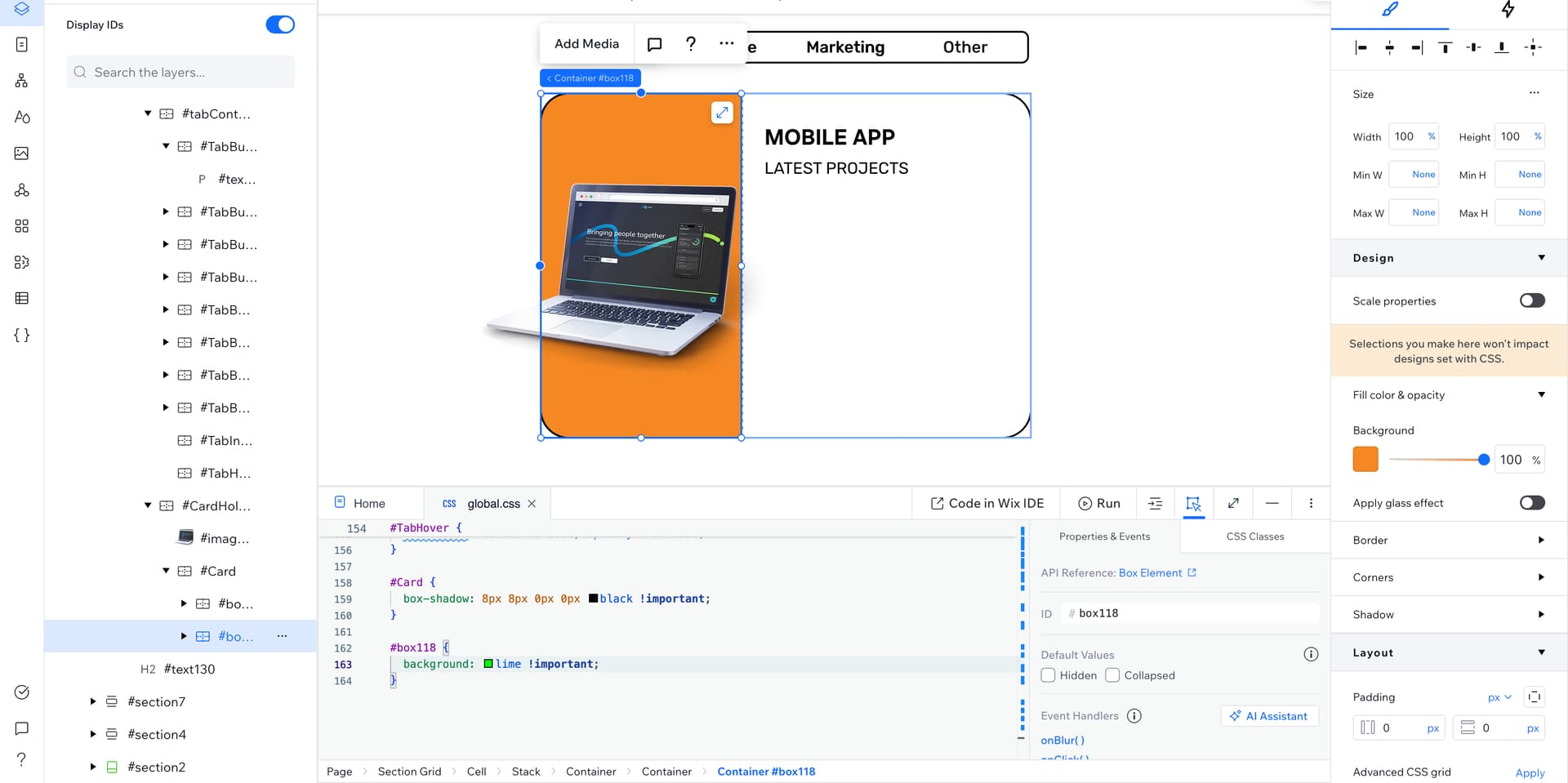
Still nothing.
Why is there a part of my CSS working and not the other??
Thank you!


