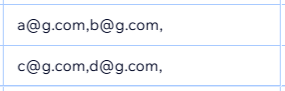
To transfer an email list to bulk send via an email client or automating with Wix’s tools, ensuring that separate emails are always recognized as such,
Question what’s the best practice to separate emails stored in a text field so it’s most compatible & convenient? A comma? space? semicolon? space + comma?
Extra context Imagine field values of multiple items need to be copied at once, & some items have multiple emails
I think a lot of this would depend on what you’re using as different processors and applications might use different separators and even then, most might use different separators for different fields but most like JSON and CSV seem to separate fields with commas (,) by default but I think you can use any delimiter if you go into the options.
I see. Thank you for the info:) Is it then recommended to always have every email address ending with a comma (even if in that field another email doesn’t follow)?
So that when this field’s values from multiple items’ are copied, they emails always have a comma
eg without that:
I believe just a comma would be needed to separate fields CSVs so long as they are within different lines. From that screenshot, it seems there might be secondary emails so you might a field to match that but I think it depends on what the use case will be.
I feel it’s okay to have some fields be empty if they won’t be required or be used for filtering information.