I’m having trouble with
I want to change the html of a text field by code (in order to change the link according to other parameters) but it doesn’t works, and i get a weird comportment !
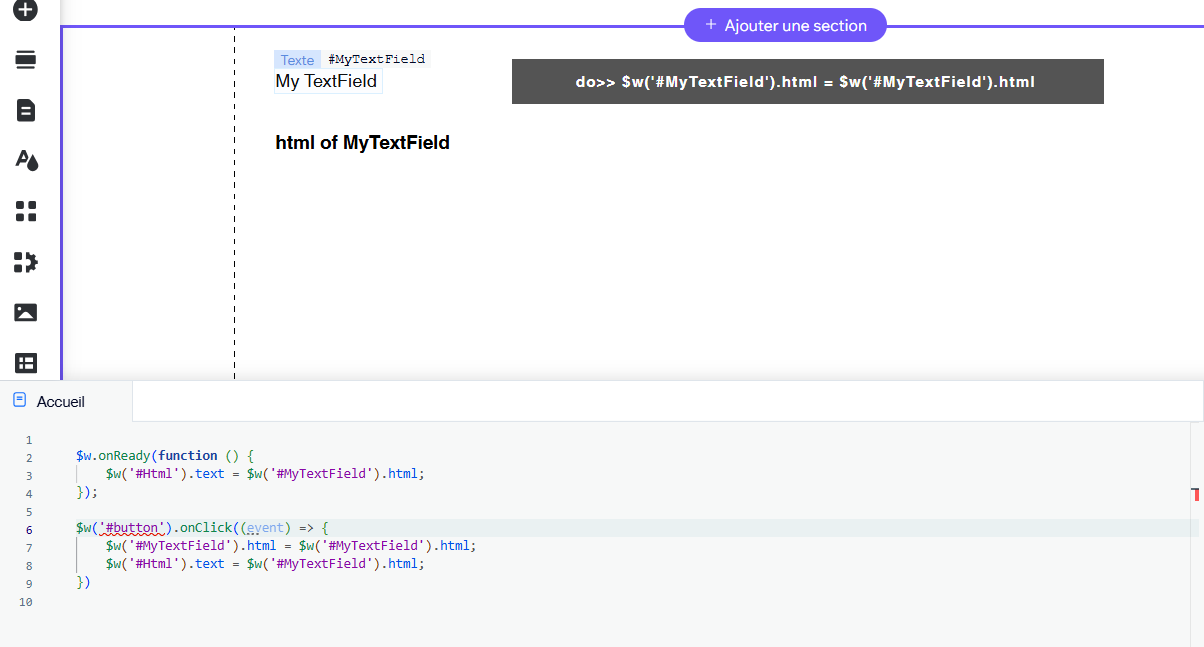
I’ve done a simple test with a simple text field and a button. In this sample, the purpose of the button is not really to change the html, but replacing the html by itself doing a simple equal (“=”) to show the problem.
$w(‘#MyTextField’).html = $w(‘#MyTextField’).html;
I have also a label to show the html of the text field.
Each time i change the html property of my text field, all occurances of ““wixui-rich-text__text” in the html are doubled !!
Working in
Wix Editor, Dev Mode
Site link
What I’ve tried so far
My code is so simple, t don’t even have idea of what to do !
You’re setting the .text value of the $w("Html") element as .html which is why it’s displaying as a string of HTML.
Can you explain the full flow of what you’re trying to achieve?
Thanks for your answer !
What i really want to achieve is to dynamically change the link within a text field. In my website, i have calculated a new link and after replacing it in the .html property of my text field, the new link works fine, but after a few occurences, it doesn’t ! Debugging this, i find that the content of the .html property of my text field was growing. Then, i made this simple example code to show this issue.
****
In fact, this issue is not on the $w’(“#Html”), but on the .html value of $w(“#MyTextField”). $w’(“#Html”) field is here only to show the html content of MyTextField.
Each time i Change some part of the $w(“#MyTextField”).html, the word “wixui-rich-text__text” (which is within the $w(“#MyTextField”).html) is automatically doubled ! In this example, i’ve just affected the same value to $w(“#MyTextField”).html, doing $w(“#MyTextField”).html=$w(“#MyTextField”).html, which normally does nothing !
The pictures 2, 3 and 4 are showing this : Each clic on the button makes the contains of the $w(“#MyTextField”) .html property growing …
Can you share the full code you’re using (the one that replaces the link attribute)?
It would also be great if you can paste the code as text and format it as such:
```js
const myCode = ‘here’;
export function myFunc() {
return true;
}
```
This will then format your code to display properly (example below) and make it much easier for people on this forum to help you.
const myCode = 'here';

export function myFunc() {
    return true;
}
Thanks @noahlovell ! I can’t give you the full code, because calculating the destination URL is a quite complex process and it’s not the problem.
I can simply reproduced this issue using this code :
$w(‘#TextFieldWithALink’).html = w(‘#TextFieldWithALink’).html.replace(“www.youtube.com”,“www.sony.com”)
This line of code replace effectively www.youtube.com by www.sony.com BUT, in the .html of the text field, all mentions to “wixui-rich-text__text” are changed too, replaced by“wixui-rich-text__text wixui-rich-text__text”.
I’ve tried to explain this to you on the picture below
@EmmaTaylor : good idea, thanks but transfering my code in the $w.onReady() instead of the $w.onClick() does the same issue …
Hi, @Gilles_Moujeard !!
Yeah, after testing it, that’s exactly what happens. I’m not entirely sure why this process is necessary, but with the help of AI, I came up with the simplest possible solution. I usually avoid using while loops because they can be risky in some cases, but this time it turned out to be really useful, so I decided to go with the while approach. I think this should successfully remove the duplicates. 
$w('#button1').onClick(() => {

    let html = $w("#text1").html;
    html = html.replace("sony.com", "amazon.co.jp");

    while (html.includes('wixui-rich-text__text wixui-rich-text__text'))
        html = html.replace('wixui-rich-text__text wixui-rich-text__text', 'wixui-rich-text__text');

    $w("#text1").html = html;

});
That is strange.
I’ve found that this works cleanly and as you would expect:
let originalHtml;

$w.onReady(() => {
    originalHtml = $w("#textWithLink").html; // store clean copy once
    $w("#textDisplayHtml").text = originalHtml;

    $w("#button1").onClick(() => {
        const newHtml = originalHtml.replace("https://google.com", "https://www.song.com");
        $w("#textWithLink").html = newHtml;
        $w("#textDisplayHtml").text = newHtml;
    });
});
Thanks @noahlovell for having solved my issue !
Well done, it works fine !!!
Hi @onemoretime
Thanks, your code remove effectively the duplicates but this last line creates a new one !
$w("#text1").html = html;


 — I hadn’t fully understood the problem.