Saving radio button values to display later on

I’m having trouble with
How do I save radio button values / data to be displayed later on?

I believe I should be using import{ session }from "wix-storage-frontend";

But I can’t figure out how to save the value when a button is clicked. This button not only needs to save the data but also move to the next page.

Working in
Wix Studio Editor

Site link
Still in testing and I don’t have permission from the client to share the site

What I’m trying to do
First, I want to say the website I am working on moves in a liner fashion.

I have 3 pages with radio buttons whose value needs to be saved and displayed on a later page. When displayed, there will be text displayed depending on which value was chosen/saved.

What I’ve tried so far
I’ve tried using import{ session }from "wix-storage-frontend";

The code for the button/radio buttons I’ve been using is:

$w('#btnNextYes').onClick((event) => {
    const inputValue = $w('#rdbGroupTested').value;
    local.setItem('mySavedValue', inputValue);
    wixLocation.to("/learn-about-your-health-1-1");
})

$w('#btnNextNo').onClick((event) => {
    const inputValue = $w('#rdbGroupTested').value;
    local.setItem('AboutHealth1', inputValue);
    wixLocation.to("/learn-about-your-health-1-1");
})

But it doesn’t seem to work. The code I’m using to display the text is:

let AnswerAboutHealth1 = local.getItem("AboutHealth1");
    switch (AnswerAboutHealth1) {
    case "yes":
        $w('#txtSummaryAboutHealth1').show();
        $w('#txtSummaryAboutHealth1').text = "You said you have been treated for hepatitis c before"
        console.log("You said you have been treated for hepatitis c before")
        break;
    case "no":
        $w('#txtSummaryAboutHealth1').show();
        $w('#txtSummaryAboutHealth1').text = "You said you have not been treated for hepatitis c before"
        console.log("You said you have not been treated for hepatitis c before")
        break;
    default:
        $w('#txtSummaryAboutHealth1').hide();
        $w('#txtSummaryAboutHealth1').text = " ";
        break;
    }

Something is missing. Advice? Ideas?

Extra context
You can msg me for any screenshots or more info.

First of all you are already on the right track → using the wix-local-storage.

But first let us clarify some facts!!!

  • session.setItem(key, value) → stores data for this session only (lost when browser is closed).
  • local.setItem(key, value) → stores data persistently across sessions.

You do import only —> SESSION

But then inside of your code, you are using → LOCAL → WHY???
local.setItem('mySavedValue', inputValue);

If you want to use both → you also should IMPORT → BOTH !!!
import { local, session } from 'wix-storage-frontend';

So, instead of SESSION, you are using LOCAL in your complete code.
But you never IMPORTED → LOCAL !

This must be your PROBLEM!!!

The gif you added is very relevant! lol out loud.

I changed this. But still no worky

Changed from sessions to local.

Would it be better (easier, more robust) to save the value to a CMS Database? The reason I did not do this was the client does NOT want to keep data and be able to say that no data is kept.

If you do not want to keep data, then use session again.

Like already mentioned above …

  • session.setItem(key, value) → stores data for this session only (lost when browser is closed).

  • local.setItem(key, value) → stores data persistently across sessions.

You do not need a CMS-based solution, since local already works like a CMS.

localStorage data is persistent — it does not automatically expire and remains stored in the browser even after closing and reopening the browser or the computer. However, it can be lost under certain conditions.

  1. When the user clears browser data (cookies/site data).
  2. When JavaScript explicitly clears it (localStorage.clear() or removeItem()).
  3. When browser storage quota is exceeded, and the browser purges old data.
  4. In private/incognito mode (especially Safari iOS) when the session is closed.
  5. When domain, protocol, or port changes (data becomes inaccessible).
  6. When the browser is uninstalled or profile is reset.

So if you don’t want to keep data, then session was already ok. So it will keep data only for the current session instead, loosing the data after user has closed the browser window.

So, looks like I will be using ‘session’ not local because I want it to automatically expire.

But the desired outcome has changed a tad, thank you client

I want a value from a radio button to be passed to a “conclusion” page where the value chosen will display text (rich format text) depending on the value passed, “yes”, “no”, or “notSure”

Each value will call rich text from a wix CMS. (Only one will be displayed, of course), I’m thinking an if statement or switch statement to determine which row is displayed?

I followed this video: https://youtu.be/jb3HRJYhFf4

But it only raised more questions.

ideas?

Ok, back again to your problem.

Looking onto your description and the very good and informative video of AMANDA (Wix-Team), i think your problem is not about the Wix-Storage. I think it is more about how to setup your wanted functionality the right way.

The Video clearly explains everything about how Wix-Storage is working.

Your aim is what?
You want to transfer a value from PAGE-A to PAGE-B, right?

I want a value from a radio button to be passed to a “conclusion” page

So somewhere on PAGE-A you have your RADIO-BUTTON → user do interact with it (clicking onto it) → and exactly at that time you want to store the clicked value to your → SESSION-STORAGE

And i think at the same time you want also to navigate automatically to PAGE-B“conclusion” page ???

.

Let’s make an example!

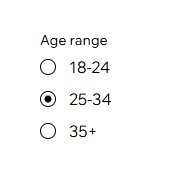
Let this be your RADIO-BUTTON-GROUP

You start like always with the basics …

$w.onReady(function () {console.log('...page is ready...');
    let myRBG =  $w('#radioGroup1');
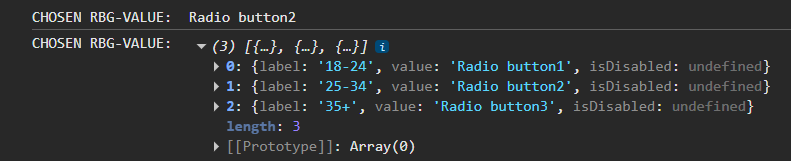
    let rbgOptions = myRBG.options; console.log('RBG-OPTIONS: ', rbgOptions);
    let rbgValue = myRBG.value; console.log('RBG-VALUE: ', rbgValue);
});

So what do we have here?
1) STARTING SEQUENCE…

$w.onReady(function () {
    ...START OF CODE... (when PAGE IS READY) !!!!
});

2) Some definitions…

let myRBG =  $w('#radioGroup1');
let rbgOptions = myRBG.options; console.log('RBG-OPTIONS: ', rbgOptions);
let rbgValue = myRBG.value; console.log('RBG-VALUE: ', rbgValue);

a) getting your RADIO-BUTTON-GROUP-ELEMENT and define it into a variable, called myRGB… → thisfor you also give it a 3-char prefix like → rgb ← normaly, but in this case we just call it → myRGB <—

let myRBG =  $w('#radioGroup1');

b) Grabbing the options of → myRGB ←

let rbgOptions = myRBG.options; console.log('RBG-OPTIONS: ', rbgOptions);

c) Getting the values of → myRGB ←

let rbgValue = myRBG.value; console.log('RBG-VALUE: ', rbgValue);

So your current total code on PAGE-A would look like…

$w.onReady(function () {
    let selectedOption = undefined;
    let myRBG =  $w('#radioGroup1');
    let rbgOptions = myRBG.options; console.log('RBG-OPTIONS: ', rbgOptions);
    let rbgValue = myRBG.value; console.log('RBG-VALUE: ', rbgValue);

    myRBG.onChange(()=>{
        rbgValue = myRBG.value; console.log('CHOSEN RBG-VALUE: ', rbgValue);
        selectedOption = myRBG.options; console.log('CHOSEN RBG-OPTION: ', selectedOption);
    });
});

Ok, as you can see i did already even implement some further code parts…
d) New variable → which we will use for selected value (THIS IS WHAT YOU NEED)

let selectedOption = undefined;

e) Using the → onChange() trigger to determine the current selection…
myRBG.onChange(()=>{...});

But if you will take a look onto all the implemented CONSOLE-LOGS (using them inside of your web-browser’s → CONSOLE <–), you will recognize that this setup is still not complete, why ???

Because for CHOSEN-OPTION you still get → all of OPTIONS, instead of the current selected one, when you do your selection. (yes you already could work with values, but we want to make it complete right?) :slight_smile:

So, currently we already do get the selected values, but still missing the currently selected option.

SOLUTION: (After some minor modifications and upgrades…


$w.onReady(function () {
    let selectedOption = undefined;
    let selectedLabel = undefined;
    let selectedIndex = undefined;
    let myRBG =  $w('#radioGroup1');
    let rbgOptions = myRBG.options; console.log('RBG-OPTIONS: ', rbgOptions);
    let rbgValue = myRBG.value; console.log('RBG-VALUE: ', rbgValue);

    myRBG.onChange((event)=>{console.log(event);
        rbgValue = myRBG.value; console.log('CHOSEN RBG-VALUE: ', rbgValue);
        selectedOption = myRBG.options[event.target.selectedIndex]; console.log('Selected-OPTION: ', selectedOption);
        selectedLabel = event.target.label; console.log('Selected-LABEL: ', selectedLabel);
        selectedIndex = event.target.selectedIndex; console.log('Selected-INDEX: ', selectedIndex);        
    });
});

Check this…

So which of the RGB’s OPTIONS has been chosen/selected ???

RIGHT —> The second one !!!

Now you learned how to work with a → RADIO-BUTTON-GROUP <— !!!

  • You have your VALUE
  • You have your OPTION/LABEL
  • You even have the INDEX !!!

What next ???

CODING-ezgif.com-resize
Now you can take those values and put them into the Wix-Storage :slight_smile:

1 Like