Ok, back again to your problem.
Looking onto your description and the very good and informative video of AMANDA (Wix-Team), i think your problem is not about the Wix-Storage. I think it is more about how to setup your wanted functionality the right way.
The Video clearly explains everything about how Wix-Storage is working.
Your aim is what?
You want to transfer a value from PAGE-A to PAGE-B, right?
I want a value from a radio button to be passed to a “conclusion” page
So somewhere on PAGE-A you have your RADIO-BUTTON → user do interact with it (clicking onto it) → and exactly at that time you want to store the clicked value to your → SESSION-STORAGE ←
And i think at the same time you want also to navigate automatically to PAGE-B → “conclusion” page ???
.
Let’s make an example!
Let this be your RADIO-BUTTON-GROUP…

You start like always with the basics …
$w.onReady(function () {console.log('...page is ready...');
    let myRBG =  $w('#radioGroup1');
    let rbgOptions = myRBG.options; console.log('RBG-OPTIONS: ', rbgOptions);
    let rbgValue = myRBG.value; console.log('RBG-VALUE: ', rbgValue);
});
So what do we have here?
1) STARTING SEQUENCE…
$w.onReady(function () {
    ...START OF CODE... (when PAGE IS READY) !!!!
});
2) Some definitions…
let myRBG =  $w('#radioGroup1');
let rbgOptions = myRBG.options; console.log('RBG-OPTIONS: ', rbgOptions);
let rbgValue = myRBG.value; console.log('RBG-VALUE: ', rbgValue);
a) getting your RADIO-BUTTON-GROUP-ELEMENT and define it into a variable, called myRGB… → thisfor you also give it a 3-char prefix like → rgb ← normaly, but in this case we just call it → myRGB <—
let myRBG = $w('#radioGroup1');
b) Grabbing the options of → myRGB ←
let rbgOptions = myRBG.options; console.log('RBG-OPTIONS: ', rbgOptions);
c) Getting the values of → myRGB ←
let rbgValue = myRBG.value; console.log('RBG-VALUE: ', rbgValue);
So your current total code on PAGE-A would look like…
$w.onReady(function () {
    let selectedOption = undefined;
    let myRBG =  $w('#radioGroup1');
    let rbgOptions = myRBG.options; console.log('RBG-OPTIONS: ', rbgOptions);
    let rbgValue = myRBG.value; console.log('RBG-VALUE: ', rbgValue);

    myRBG.onChange(()=>{
        rbgValue = myRBG.value; console.log('CHOSEN RBG-VALUE: ', rbgValue);
        selectedOption = myRBG.options; console.log('CHOSEN RBG-OPTION: ', selectedOption);
    });
});
Ok, as you can see i did already even implement some further code parts…
d) New variable → which we will use for selected value (THIS IS WHAT YOU NEED)
let selectedOption = undefined;
e) Using the → onChange() trigger to determine the current selection…
myRBG.onChange(()=>{...});
But if you will take a look onto all the implemented CONSOLE-LOGS (using them inside of your web-browser’s → CONSOLE <–), you will recognize that this setup is still not complete, why ???
Because for CHOSEN-OPTION you still get → all of OPTIONS, instead of the current selected one, when you do your selection. (yes you already could work with values, but we want to make it complete right?) 
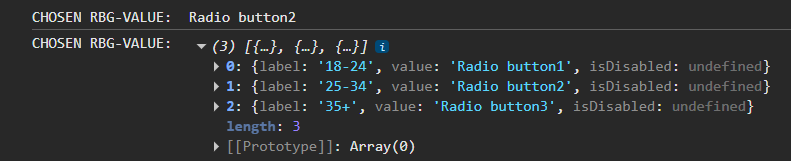
So, currently we already do get the selected values, but still missing the currently selected option.
SOLUTION: (After some minor modifications and upgrades…
$w.onReady(function () {
    let selectedOption = undefined;
    let selectedLabel = undefined;
    let selectedIndex = undefined;
    let myRBG =  $w('#radioGroup1');
    let rbgOptions = myRBG.options; console.log('RBG-OPTIONS: ', rbgOptions);
    let rbgValue = myRBG.value; console.log('RBG-VALUE: ', rbgValue);

    myRBG.onChange((event)=>{console.log(event);
        rbgValue = myRBG.value; console.log('CHOSEN RBG-VALUE: ', rbgValue);
        selectedOption = myRBG.options[event.target.selectedIndex]; console.log('Selected-OPTION: ', selectedOption);
        selectedLabel = event.target.label; console.log('Selected-LABEL: ', selectedLabel);
        selectedIndex = event.target.selectedIndex; console.log('Selected-INDEX: ', selectedIndex);
    });
});
Check this…

So which of the RGB’s OPTIONS has been chosen/selected ???
RIGHT —> The second one !!!
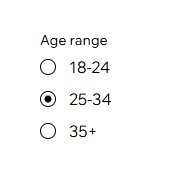
Now you learned how to work with a → RADIO-BUTTON-GROUP <— !!!
- You have your VALUE
- You have your OPTION/LABEL
- You even have the INDEX !!!
What next ???

Now you can take those values and put them into the Wix-Storage