How to resolve the sdk injection error

Hi Wix Support Team,

I’m developing a custom Editor Add-on panel for Wix Studio using Vite (served locally via ngrok). The panel loads correctly inside the Editor, but the Wix SDK is not detected. The console shows:


[Wix SDK] Not detected yet. Running in simulation if opened outside Editor.

and my code relying on wixEditor.onReady() or window.wixSdk never executes.

I’ve already:

  • Set the panel URL to a valid HTTPS ngrok link (e.g., https://xxxxx.ngrok-free.dev/)

  • Enabled HTTPS in Vite

  • Reinstalled the app on my dev site through Test App → Test on dev site

  • Confirmed permissions (Manage Media Manager)

  • Tried both Studio and Classic Editor

However, the SDK still isn’t injected into the panel iframe.

Could you please advise what might block the SDK handshake between the Wix Editor and the iframe?
Is there any additional configuration or header required for the local dev setup to work correctly with the Editor Add-on SDK?
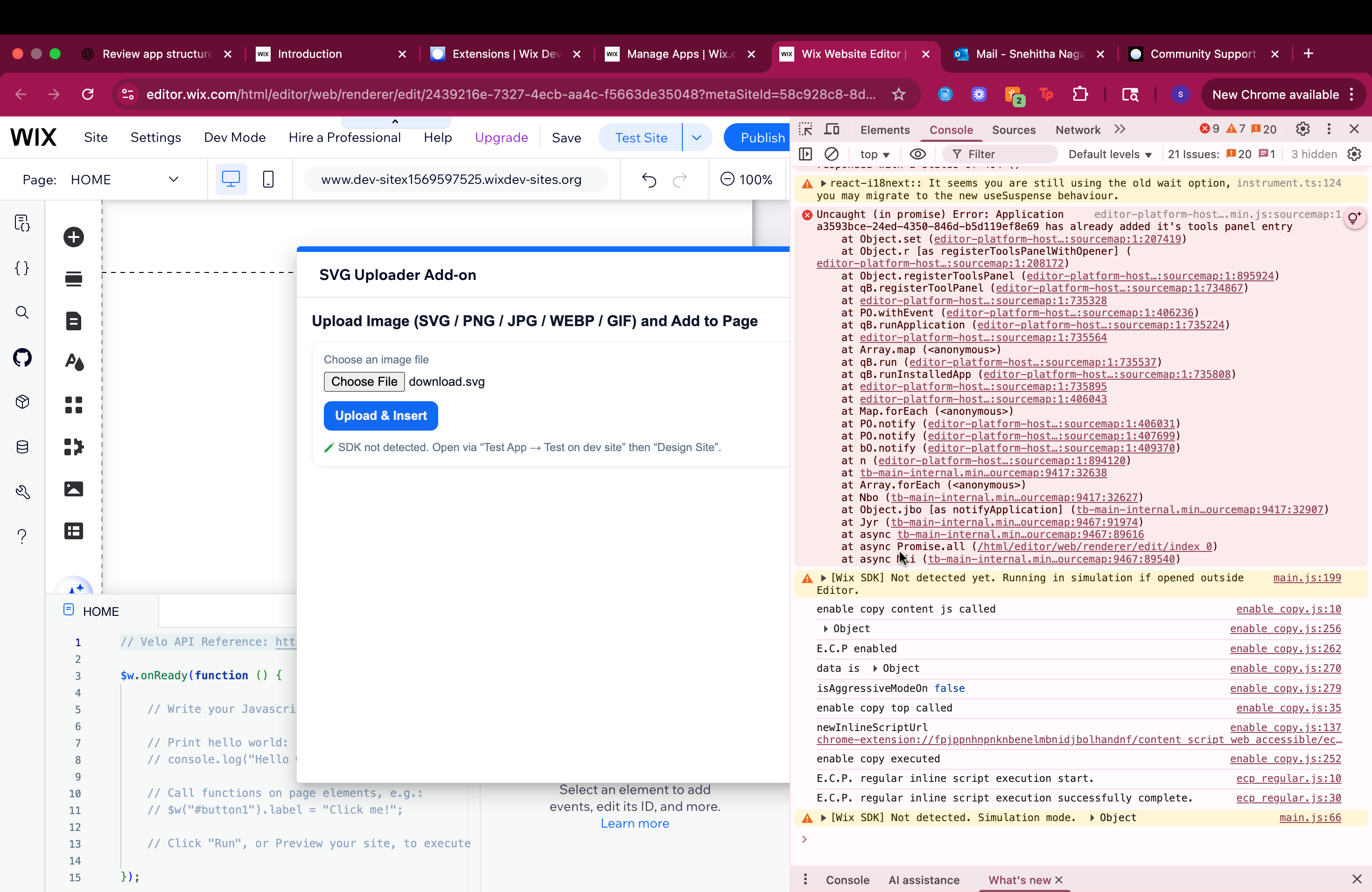
Thank you for your help,

You can try following methods -

Add the ngrok-skip-browser-warning header in the vite config file -

export default {
  server: {
    headers: {
      'ngrok-skip-browser-warning': 'true'
    }
  }
}

You can try bybassing it as well - https://xxxxx.ngrok-free.dev/?ngrok-skip-browser-warning=true

Also, Ensure your Vite dev server allows framing

export default {
  server: {
    headers: {
      'X-Frame-Options': 'ALLOWALL', // or remove this header entirely
      'Content-Security-Policy': "frame-ancestors *;"
    }
  }
}

Wait for the SDK with a proper timeout:

function waitForWixSdk(timeout = 10000) {
  return new Promise((resolve, reject) => {
    const startTime = Date.now();
    
    const checkSdk = () => {
      if (window.wixEditor || window.wixSdk) {
        resolve(window.wixEditor || window.wixSdk);
      } else if (Date.now() - startTime > timeout) {
        reject(new Error('Wix SDK loading timeout'));
      } else {
        console.log('[Debug] Checking for Wix SDK...');
        setTimeout(checkSdk, 100);
      }
    };
    
    checkSdk();
  });
}

// Usage
waitForWixSdk()
  .then(sdk => {
    console.log('Wix SDK loaded!', sdk);
    // Your SDK code here
  })
  .catch(err => {
    console.error('Failed to load Wix SDK:', err);
  });

Also add a debug console log

console.log('Scripts in page:', 
  Array.from(document.scripts).map(s => s.src)
);

// Check for Wix-specific globals
console.log('Window properties:', {
  wixEditor: !!window.wixEditor,
  wixSdk: !!window.wixSdk,
  Wix: !!window.Wix,
  wixDevelopersAnalytics: !!window.wixDevelopersAnalytics
});

By the way, check the required SDK installation files as well in your project. In Blocks, it is added from the App settings

1 Like