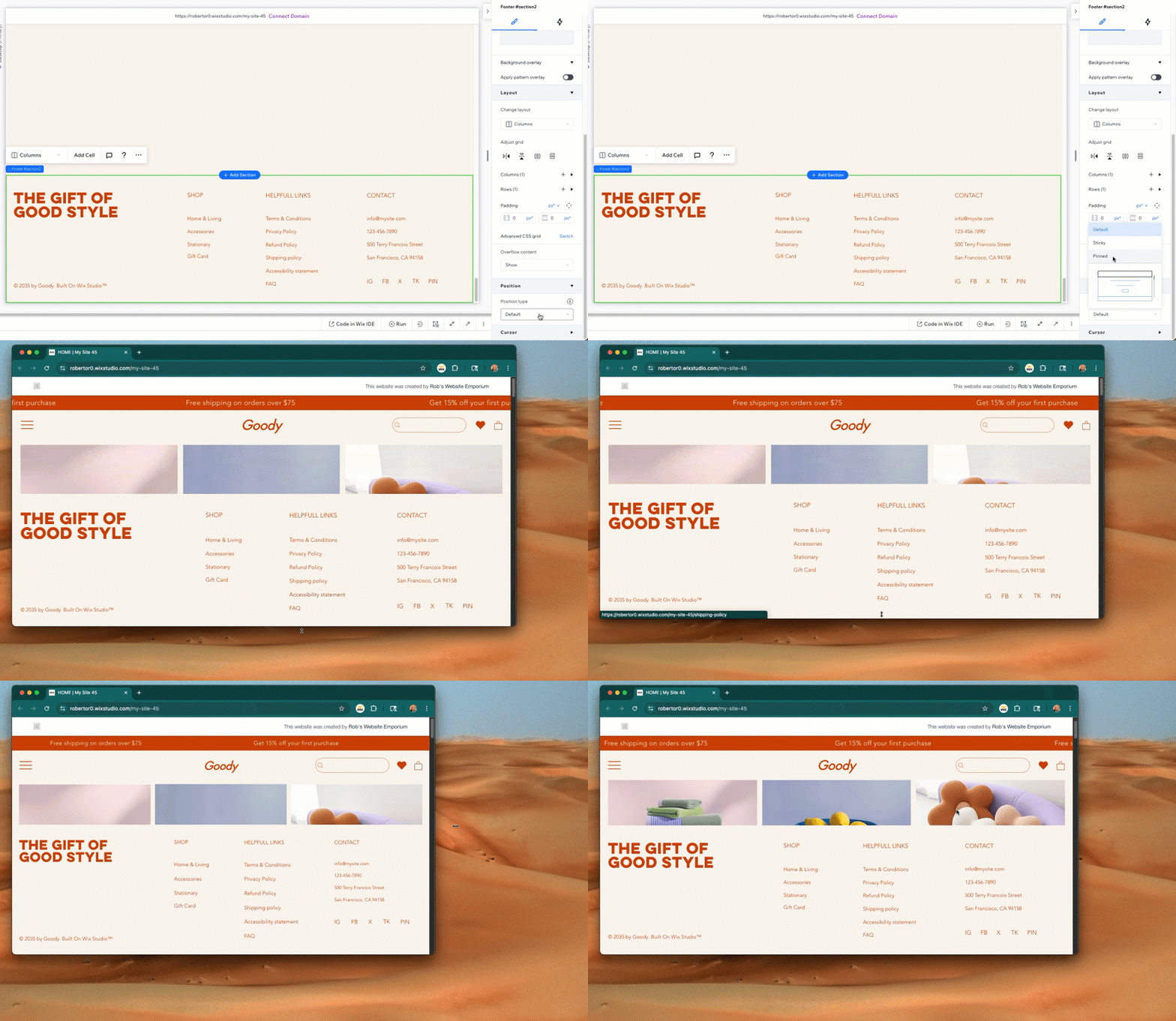
I am having trouble with resizing an element on my website or lets say I do not know how to place the footer of my website always at the very bottom. The footer is set to fix, so it will not scroll with the page. It stays on the exact same position. But this position is different depending on the display the customer has. If the footer is not exact at the bottom of the page I can start scrolling, even if there is nothing further on that page. I found a solution, but I can not really implement it. My solution is:
wixWindowFrontend.getBoundingRect().then((windowSizeInfo) => { let windowHeight = windowSizeInfo.window.height;
That makes it dynamic and if I could set now the height of “section1” (Which is in my case the viewport of my website) or if I could set the Position Y for my footer, the problem would be solved. That is such an easy thing, but Wix does not allow to resize or to set positions (X,Y) for elements. Fingers crossed that someone knows what to do here. To warp this up: I just want to have the footer placed dynamically … so that it is always at the very bottom of the canvas.
If the goal is to have the footer (or an element) at the bottom of the page, you can set it to pinned so that it always in the same place. Make sure it’s docked to the bottom and pinned to the page and it will always be there:
great and thanks for your help. While this is a solution for having the footer always pinned (frozen) at the end of the page it is still a problem if you have not much on a single page. Let’s say you have a lot of content, then you can scroll and the footer stays on place. If you have only a logo on your page the footer is not at the bottom instead it is somewhere in the middle of your screen. Meaning: The footer is only at the bottom of if you have enough content to scroll. How to bring the footer at the bottom if there is nothing to scroll?
Example: www.Aelfsciene.com
On a 24" screen you can still can scroll at the HOME tab, even if everything is already visible. If I bring the footer higher it does not snap to the bottom (which would fix the problem) and if bring the footer lower then the screen height it snaps, but the can scroll.
Thanks again for your help, but that is driving me nuts. XD
If the site is a Wix Studio site, you could set the section height to 100vh and it will allow the section be as large as the viewport height of the browser or set the section to Fit to Screen.
If this is the Wix Editor, it’s not fully responsive though there are some elements that are width-responsive but not responsive to the height of the browser. There is a feature request for responsive sites within the Editor and within the coming weeks, the ability to make a site branch to keep the backend information of the site but then with the ability to recreate within Wix Studio if you want/need a fully responsive site.
Hey, thanks for your help man. Yeah I heard that it is only possible in the studio version. Actually I can not believe that such a basic function (which I could literally script with WordPress for free) is not implemented for a subscription based web hosting / WYSIWYG Editor. Sorry, but that has nothing to do with the editor. You basically can get the visible canvas height and subtract the height of your footer which is the value where the footer has to be. Combined with a listener (if someone changes the browser GUI while he is on the page) and your are pretty much done. But it is not allowed to set X/Y values in the standard editor - which brings up the next question: Why? It would not be a problem if you just could switch to the studio editor, but then you have to rebuild your side from scratch. Hmmm … I find it difficult in 2025 to release an Editor which is not compatible to the old one. That alone is insane.
Bla Bla Bla … to find a simple workaround for such a basic option is crazy and somehow disappointing and it should not be like that for paying customers. If they release an Editor which does not allow to convert the side so that it looks at least 90% like the old one, they should do that for you. Again: You are paying money for that and why? Because you want to have a side which always fits the current standards, gets updates, gets security patches and because you do not want to code everything from scratch to safe time.
Still man … thank your for taking your time and your great help. Have a great day.
You can try to add a → SPACER-ELEMENT which you could try to control dynamically, placing it between CONTENT and FOOTER (for example a CONTAINER/BOX).
Then you use → wixWindowFrontend.getBoundingRect() ← like you already tried to do.
Now when your footer gets displayed to high on your screen → expand the spacer dynamically (transparent) to push the FOOTER again back to bottom.
Add a spacer between content and footer.
Measure remaining space on load using wixWindowFrontend.getBoundingRect().
Expand spacer dynamically to push footer to bottom.
Avoid fixed footer unless truly necessary.
import wixWindowFrontend from 'wix-window';

$w.onReady(function () {
  wixWindowFrontend.getBoundingRect()
    .then((rect) => {
      const windowHeight = rect.window.height;
      const documentHeight = rect.document.height;

      const gap = windowHeight - documentHeight;

      if (gap > 50) {
        $w('#spacerBox').expand();  // make sure this box is pre-set tall enough
      } else {
        $w('#spacerBox').collapse();
      }
    });
});
To go further and improve it even more you can place several boxes with different heights to your page and then decide by calculation which box to expand to push the FOOTER by your generated SPACER-LOGIC.
Or you even use just the MSB (Multi-State-Box) and select the right STATE of MSB related to the calculation results (using the MSB → your site do not get messy and page do not have so much elements to load)