You may have heard that we have a major launch happening tomorrow. It’s important to us that our community hears about it first.
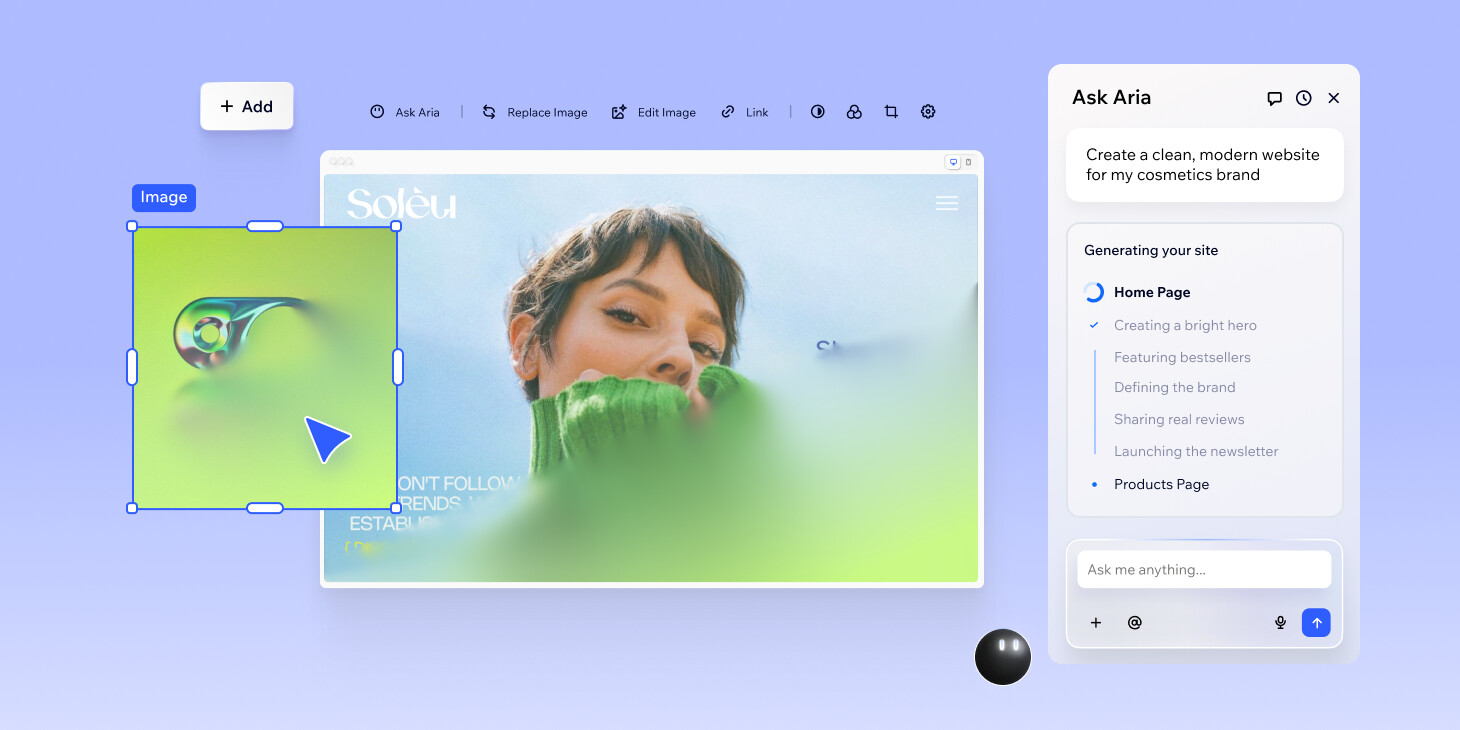
Wix Harmony is our brand-new editor designed specifically for self-creators. It’s a first-of-its-kind hybrid experience, combining AI prompt-based creation with our signature drag-and-drop control, all powered by Wix’s enterprise-grade infrastructure.
We know that for those of you who build professionally, announcements like this raise some important questions and we’re here to answer all of them.
Let’s break it down:
What Wix Harmony is (and who it’s for)
Wix Harmony is a first-of-its-kind hybrid experience, combining AI prompt-based creation with our signature drag-and-drop control. Designed for self-creators who want to move quickly and launch fast, it’s also an ideal fit for projects where you’d typically reach for the Wix Editor.
As our newest editor, it’s built to deliver:
- A cleaner, more consistent UI and editing flow
- Auto‑responsive design (with direct control over one desktop + mobile breakpoint; the rest is handled for you)
- Familiar drag‑and‑drop with a smarter alignment grid to keep designs visually sharp and consistent
We’re also introducing Aria, a built-in agent that offers guidance and performs direct business and design actions. Aria is designed to handle the heavy lifting within the Wix Harmony Editor and Dashboard, allowing you to focus on the creative vision and strategic decisions
A quick note on AI
We know AI brings both excitement and concern, especially for agencies and professionals who offer expertise, strategy and execution. We want to be very clear about our approach to AI: It’s here to remove repetitive work - not replace professional creativity. AI, and the tools that we’re building, can reduce busywork and speed up interaction. That opens up space for creatives to be creative while focusing on the strictly human aspects of their job - strategy, context and craft.
Important notes:
Most apps are available on Wix Harmony. You can find the available apps by checking the App Market inside the Wix Harmony Editor and in the dashboard, as you do currently.
As this is a new editor, not all business solutions and capabilities are yet supported. We are continuously evolving the platform, with more features and capabilities being added in the future, including:
- Wix Multilingual
- Wix Portfolio (Now available)
- CMS
- Wix Restaurants
- Accordion
- Audio player
- Glass effect
- Multi-state box
- Tabs
- Text mask
Code
As Wix harmony is designed for self-creators, it will not support custom code. This does not affect your existing Wix and Wix Studio sites—you can continue adding and editing code on them as usual. If you rely on code, advanced logic or APIs, Wix Studio is the platform built specifically for you.
Rollout
In the next few months we will gradually roll out Wix Harmony to all Wix users while it lives side-by-side with the Wix Editor. Migration between editors is currently not available.
What’s next for Wix Studio
If you’re building high-end sites for clients, nothing changes about our core recommendation: The Wix Studio Editor + Workspace remain your go‑to for advanced web creation, responsive precision, custom code and managing clients at scale.
The same AI innovation behind Harmony is also coming to Wix Studio. We’re actively working on bringing these capabilities into the Studio Editor in a way that respects how you build, collaborate and ship client work at scale.
As you explore Wix Harmony, we’d love your feedback. It helps us understand what’s most valuable to your process, directly influencing how we prioritize and refine these new features and capabilities for the Studio ecosystem.
How to try Wix Harmony
- Enter this link on desktop
- Start building by prompting Aria or with a Wix Harmony template
- The new site will appear in your Workspace
To create another site with Wix Harmony during rollout, you need to follow the same link above (or through the email you received).
If you have questions, I’m happy to answer 
FAQ
Do I need to switch from the Wix Editor to Wix Harmony?
No, you do not need to switch. In the next few months, Wix Harmony will live side-by-side with the classic Wix Editor as we roll it out gradually. This does not affect any existing Wix Editor sites—you’ll be able to keep editing and maintaining them.
Wix Editor sites remain live and the editor remains unchanged. If we have any updates to the Wix Editor, we’ll notify you in advance.
What happens to my existing sites?
Live sites will remain active with no changes to their current performance or functionality. You can continue to manage and run your existing sites exactly as they are without moving them.
Is Wix Harmony replacing the Wix Editor?
Wix Harmony and the Wix Editor are both available and live for you to use.
The launch of Wix Harmony does not affect any existing Wix Editor websites or the ability to create new ones. The Wix Editor sites remain live and you’ll be able to keep editing and maintaining them.
If in the future there will be any changes or updates to the Wix Editor, we’ll notify you in advance.
What are the Premium plans for Wix Harmony?
Wix Harmony will have the same Premium plans as Wix.com, you can review them here: https://www.wix.com/plans
Will the AI features in Wix Harmony require extra payments?
Currently, Wix Harmony has the same premium plans as Wix Editor and the AI features within Harmony will not require additional charge.
I’m an app developer, will my apps be available in Wix Harmony?
You can build apps for the Wix App Market that are also compatible with Wix Harmony by using Site Widgets and Site Plugins built with the Wix CLI or a self-hosted setup.
However, apps created on Blocks are not currently supported in the Wix Harmony Editor. This means you won’t be able to install and use Blocks apps in Wix Harmony sites for now.
Your Blocks apps remain available for both Wix Editor and the Studio Editor and you can use them as usual.
For more information, read below:
Will the Wix Studio Editor get the same AI capabilities?
The same AI innovation behind Harmony is also coming to Wix Studio. We’re actively working on bringing these capabilities into the Studio Editor in a way that respects how you build, collaborate and ship client work at scale.
 I still love it and use it to this day.
 CMS is in the works, but I understand if you need to launch your project sooner.

