Hi Josh, I’m Betty from EditorX product team.
Thank you for your feedback.
We will make sure to add the option to un-highlight the text component.
Just wondering if anyone else is getting glitches today when adding sections; for instance I added a banner section which it tried to place in a 1sq/inch portion of the screen - when I tried to delete it I was left with items that couldn’t be selected. I did get a screen capture but I wanted to see if anyone else was getting these issues too before I get more captures.
I just started on the other 2 when spectrum internet crashed Nationwide. So this is the only one that I finished all 3 break points on https://ourstudioco.wixsite.com/allie-stetson
That looks really nice - good job 
@nathan-delle Thank you! Looks great.
So… after a few days - or maybe its been a week already!! - playing in EditorX, I have to say I’m super excited to get to some serious design work once I know all the possibilities and how to achieve what I design!!
My focus so far has been to try all the functions and see what they can do. I started with templates and adding predesigned sections then created from the blank template.
This is a homepage for my own design business, I used 5 custom breakpoints to best show on all devices and screen sizes. Feel free to let me know how it can be improved or if it doesn’t show correctly on your screen size.
https://janethannahdesign.wixsite.com/jhdx2
For the EditorX team - amazing job making this editor usable for those of us with no coding experience!! Thank you all!!!
Below are a couple of my thoughts for additions, fixes etc. Some may be my oversight!!
Hamburger menu:
Not able to reposition the opened menu (full screen/left/right).
Not able to realign the text on menu and sub menu.
Text colors selectors do not denote what they are applied to.


Could scalable text also be applied to buttons and menus?
Custom added breakpoints don’t apply to masters automatically.
Always show zoom button next to undo/redo (even when at 100%).
Is it possible to set a gap between sections?
Edit grid:
Setting gaps option does not show for grid without columns.
If column is too narrow can not click to modify without zooming in.
If the bottom row is small and at the bottom of your screen, the input box for height etc is off the bottom of the screen.

Repeaters:
No way to change the name of each item in the manage items list.

Trying to right click a section (eg: to clear overrides or to set as a master) when contains a full image does not work. Even if section is selected in breadcrumbs
Similarly selecting container for an image - if an image is in one of the flex box containers and stretched to fill, there is no way to select the container to move the order without shrinking the image - even on the layout exercise on the Academy page of EditorX tutorials.
Hope these all make sense… 
Also: the gallery is doing some crazy flickering on Safari (Mac and device)!! OK on chrome though!!
Hi @janet , I am Naama from EditorX Product team. Thank you for the extensive feedback. We appreciate all the insights and inputs and we will review them in detail. About the Gallery bug that you have indicated. To help us investigate it, could you please open the builder and submit a bug through Help and Feedback, and if you could kindly also add a link to your site it will be super helpful. Thank you
@naamar Sent, sorry for the delay!
Okay so I’ve only had Editor X for a few days - so here is my feedback so far: Day 1 was a day of playing with each of the new features and learning about how it all works; Thank you Editor X team! I love the new editor and its abilities. I do a lot of work in Adobe Illustrator and the old Wix editor and found that I had to adjust my designing to live in the middle, once I did this I found editor x a lot easier to work with, because although it is far more advanced than the old editor it still has its limitations with regards to being free-form (this is a reflection on my ability to adapt and not editor x, just want to make that clear as I understand the complexities around creating this editor).
Day 2 I found that the editor became a little glitchy (not sure if there were updates going on???) I did get a screen capture video to give to the editor x team but couldn’t attach it as it wasn’t youtube or vimeo. Basically when I was selecting a simple shape or container and moving it around, it would jump to the left of the screen until it disappeared completely… but it was still on the layers menu - I had to just delete it each time.
I’m now on day 3 of using the editor and I will publish what I have so far for people to view - Bare in mind that it’s a work in progress and will become our final website for our business:
https://hallistic.wixsite.com/editor-x-v2
Today I did find a new issue along with the issues Janet has already compiled.


I found that when I was adding text to the grid, it is not attaching - Its docking points are not correct on the righthand side as you can see. And if I try to setup the text to the grid via the Grid Area, the text is flipped and unusable. Any thoughts on whether I’m doing something wrong?
So far I love this editor and cannot wait for further updates and features, Great Job! I’ll give more feedback in the next few days.

Just tried to add a social bar as vertical onto a vertical section and it placed it off-screen. … any ideas?
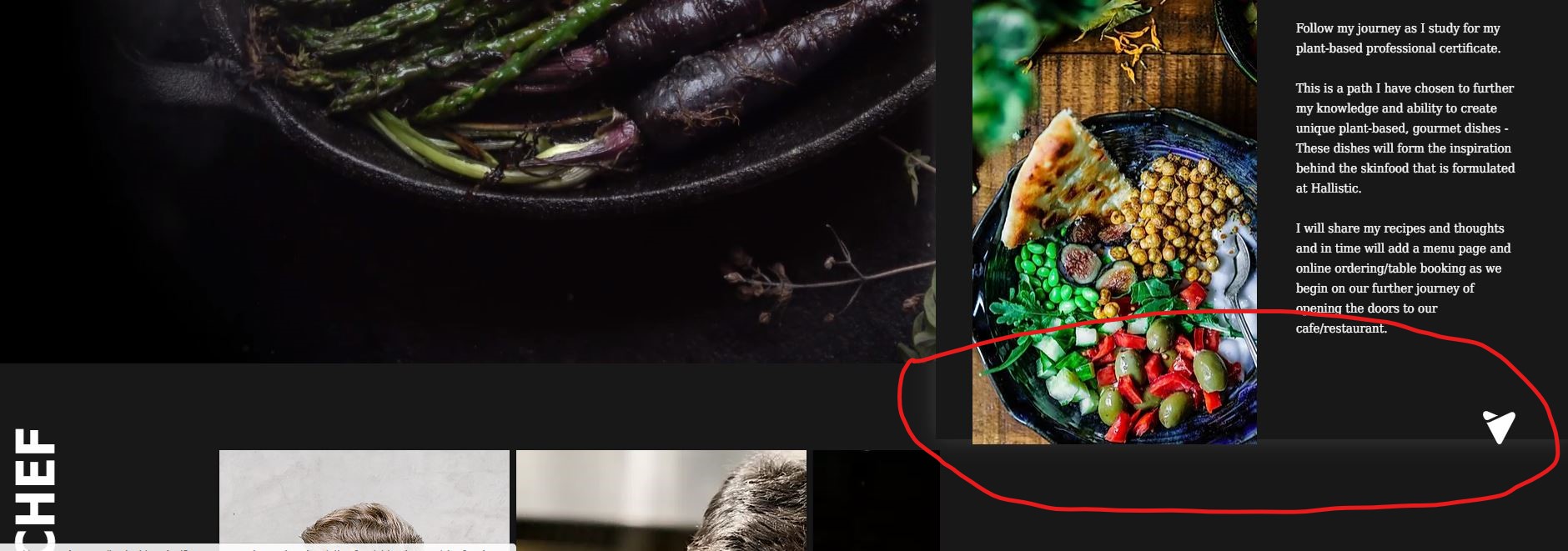
I also notice that when I published the site there are positioning errors that are emerging - There seems to be a big difference between what you see on screen, in preview and then on the published site.
Hi @brett ,
I have a list of small-bugs I have found on the editor.
Is this the best place to post bugs/errors? or should we submit a ticket to Support? I don’t want to spam this Forum with small bugs. or should I?
Hi David, please feel free to share your experience and any bugs you may encounter with EditorX, by using the widgets under Help & Feedback in the Editor.
All submissions go to straight to the Product team and we always follow up 
Hi Josh,
We appreciate the helpful feedback and are glad that you are finding great value in the product.
We are working daily to resolve the existing bugs and implementing the right protocols and tests to catch issues before they appear on production. If you come across any issues, please click on Help & Feedback in the top bar of the Editor and submit the bug/feedback there. Note: You can attach only mp4 files to the forms.
All submissions are delivered directly to our product and developer teams to investigate.
Regarding the issues you mentioned above, we are investigating and you should recieve an email from us soon.
Thank you for your time in putting together this feedback.
Kind Regards,
Editor X Team
Hello Wix Team, In new blog wix website copy paste not working in inside blog post. I tried via shortcut keywords and mouse and also tried in different browsers like google chrome, internet explorer etc. Kindly requesting to the team please check in to the issue resolve the issue as soon as possible.
Thanking you
Abhinand PS
Blogger
Thanks @sebi-vidret you are doing an amazing job and I can only imagine how difficult it is. Thank you!
Hi Abhinand,
I’m Roni from the Editor X product team.
Thank you for being part of our beta group and helping us improve the product!
For now, I was not able to recreate the issue you are describing. If you could please provide a screenshot or even a screen recording, that would greatly help us understand the problem and assist you.
Thank you for your patience and hoping to hear back from you soon.
Roni
Hello community,
I spent an hour in all on the new editor X which takes the functionality of the current editor well. What annoys me the most is that I learned about Wix thanks to the templates already existing in the Wix database and, I used to test, analyze try to reproduce the elements present.
So I didn’t try to go further because I was discouraged…
Unfortunately, the few templates present in the EditorX in no way reflect the reality of the corporate and small business market. So without a template related to the activities of our customers, I think it would be difficult (for me) to go to this editor X for now.
So give us about thirty templates of craftsmen, service providers, merchants, hotels… so that we can learn “live” how to use it after by ourselves !
Thx
Denis
I was wondering if it was possible to link a layouter to the blog pages yet or if this is something being worked on? I’m working with members pages and blog pages at the moment.