I keep trying the editor. I like ready-made blocks, but even with them I have difficulty with the adaptive. if I just changed the font size on my mobile phone in the old editor, everything was fine. now everything is changing. 1) made a version on the PC, 2) began to edit the tablet,3) mobile - in the end, everything shifted to the PC and so a vicious circle. I don’t understand how to make it not move out. On the old reactor, it is easier - the mobile phone depends on the PC version, but there is no way back. Plus, in the mobile version, I wanted to hide the block - but it hides the entire strip and not the section. Many nuances are not clear.
Oh Yes, I also lost the function of moving pages in the menu - something higher than that below, and the stripes themselves on the page I can not swap
Heya,
Is it just me or is the possibility to show elements on all pages gone in EditorX? I know about masters but what do we do if I want to show a single element on all pages? It seems a little to much that we must create a section and add one element in to the section and then set that section to be a master to be able to then show the element on all pages, dosen’t it?
Correct me if I’m wrong or if I missed the feature in the editor.
Many thanks! =)
/Joe
Hello Friends, I would like to know, will it be possible in the future to transfer website from Editor to Editor?
Hi Josef,
I’m Maayan and I work for the Editor X team.
Thank you for your feedback and for being in our closed beta group.
We are constantly working to improve the experience and capabilities of Editor X.
The ability to create a single element as a master is already in the pipeline 
Please feel free to reach out again if you have any more feedback or ideas for us.
Best regards,
Maayan
Hi Arman,
I am Maayan and I work for the Editor X Product Team.
As you said - currently, transferring a site between the Editors is not supported.
But, our team is working on implementing this feature in the future, so stay tuned!
You can keep up to date with our updates and releases here: https://www.wix.com/editorx/updates-and-releases
Thanks,
Maayan
Thanks
@lipatovaa1991 Hi,
I’m Maayan and I work for the Editor X team.
Thank you for your feedback and for being in our closed beta group.
The responsive editing behavior in Editor X is that the design and layout you edit on desktop cascades down to the lowest breakpoint. If you want you can create an override on the lower breakpoint so it won’t affect the desktop (or the breakpoints above it).
If you had trouble with this issue, please report a bug from the the Editor X Help & Feedback.
Regarding to reordering pages in the menu - our team is working on implementing this feature in the future, so stay tuned!
Hi Denis! I’m Maayan and I work for the Editor X team.
Thank you for your feedback and for being in our closed beta group.
Our design team is constantly working to improve and create more beautiful templates for the Editor X.
In the meantime you can find our designed sections come in handy for you.
Just go to the Add Panel > Sections.
I will share your feedback with the Design team.
Please feel free to reach out again if you have any more feedback for us.
Kindly,
Maayan.
Hi Wixers!!
Is there a chance that all of the useful tools in the basic Wix Editor going to get migrated on to Editor X? (i.e. Multi-State box, all other user inputs, the new button layout, etc.)
Also, how does collapsing an item work in Editor X? I have had some challenges because some items would collapse but other items below it or around the item would not readjust to fill in the missing item. Please let me know if you understood my 2 questions.
Best,
Nino
#CORVIDISAWESOME #wixisawesome #editorxspecialist
@maayank Thank you for your reply Maayan. Okey, sounds great! Looking forward to see more amazing things in EditorX. =)
thanks for the answer. I also ran into this problem: I created a vertical menu (in promobox), edited the font, but now the menu looks different and I can’t edit it (no settings are available) and delete it too.


here is my site
https://lipatovaa1.wixsite.com/mysite-17
Hi Nino,
I am Sebi from the Editor X Product Team. Nice to Meet you
We are definitely working on adding the components from the Classic Editor, we are currently working on many of them. You should be able to see them and use them soon.
When it comes to dynamically expanding/collapsing items it is important to set up the height and of the parent of the item correctly. It is best practice to set the height to auto and if you have a grid to “min-content” or “max-content”.
Tip: Auto calculates the height of the parent based on the content inside it.
For more precise design control, you can add max and min values to the height.
You case may be more specific so I would need to have the site to see what is happening.
Please let us know if this answers your questions.
Kindly,
Editor X Team
Hi Guys, here some comments, questions and bugs:
@sebi-vidret
Bugs:
1) The editor won’t open:
After I gave access to a Contributor on the test-site we are running, the editor is not opening anymore, for this site: https://davidcamachob.wixsite.com/dianatesting , can please support Team take a look? we would like to keep working on that version we were working on, otherwise I guess duplicating the site will work? (And yes we cleared cache and tried other browsers).
2) Hidden elements appear and Theme changes: Sometimes the Theme of an element changes from the Editor version to the published version, for example, take a look at the button “Read More” at the bottom of the site, that button doesn’t look like that on the editor but in the published version it changed: https://davidcamachob.wixsite.com/dianatesting

Questions:
1) Testimonies sliders: How can we achieve the standard testimonies sliders? We can’t find the option for text+image sliders like the testimonies at the bottom of this page: https://www.namolevu.com/

2) Margin to Strips How can we achieve the ‘Margins’ on strips on editorX? Like on the previous editor when we were able to stretch a Strip and add a margin to the borders:

That’s all for now Team, thanks!
We are trying to re-design our own website https://www.yourweb.co.nz/ on the editorX. So please regarding the Bug #1, let me know if I should submit a ticket? we are not able to open the editor of the website we were building so we can continue working.
Cheers!
Hi everyone.
Tonight was my first time trying the Editor X and I’m super confused. I don’t see any way to add a slideshow (which is located in the Interactive menu on the old Editor). Does anyone know where this feature is in Editor X?
Also, I can’t find strips anywhere which is really a bit depressing since I really wanted an animated menu (video strip attached to header).

Thanks.
Sections = strips
So, how do we attach the “Section” to the header? We’re not seeing any way to make a video background on the header like in the Old Editor…
@steviesylva56658 Things are different now on the new Editor, you don’t attach Strips to headers like before. That is why we are all learning here, There are more advance features for what you are trying to achieve, I would suggest watching first all the videos here:
https://www.wix.com/editorx/academy
Thank you.
Hi David,
Thanks for reaching out to us. We love how your new Editor X site is coming along.
We appreciate that you raised the bugs that you experienced.
I will go ahead and open the investigation for our developers, you should receive two emails from our team within the next hour. We will need more information regarding the editor not loading as we are unable to reproduce.
It appears that the testimonial sliders were created with a slideshow component, which is currently being developed and adapted for EditorX. You can get a similar experience using the Layouter with the “Slider” layout to have a horizontal scroll.
Stay tuned for updates regarding Slideshows!
In regards to the margins in strips, please keep in mind that we don’t use strips in Editor X. We now have Sections and Containers, which are more versatile.
You can definitely add margins to your sections or containers. There are a few ways to do this.
Using grid
On Sections, you can create a grid (Select " Apply Grid ") and create rows/columns as margins.
See example below:

Using Docking + Margins
Add a container/background image (or other component) and use the margins + docking of the element to keep a distance from the edges.
See example below:
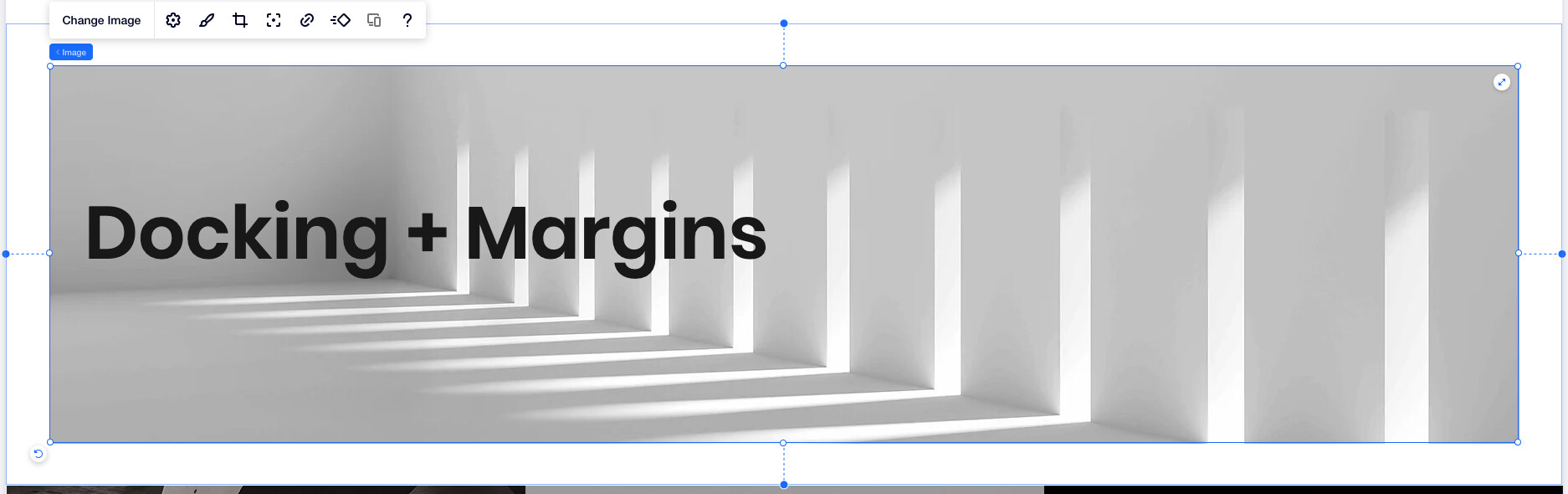
Something very cool you can do now is use % values (and other responsive units) for margins, this means that the margins will be responsive not just the components.
You can see how the left and right margins get smaller as the screen gets smaller.
Please let us know if you have any additional questions.
Best of luck!
Editor X Team